Sunday, June 11, 2017
LG V20 Sprint LS997 Initial Impression
Friday, September 12, 2014
SONY Walkman NW-M505 Review – aptX demystified
Wednesday, August 10, 2011
PS3 firmware 3.55->3.56->3.60->3.61->3.65->3.66 Nothing but Security Patches!
Haven’t updated for the firmware for quite some time, but nothing notable new features have been introduced since 3.55, because SONY has been busy combating with hackers. But thanks to that we all get some free games.
3.55 and 3.56 are pure security patches to disable jailbreak.
3.60 adds online storage (manual) and controller save setting.
3.61 forces user the PSN login password after the infamous hacking which caused the network down for almost two month.
3.65 and 3.66 are security patches as well. 3.65 is not mandatory, while 3.66 is, not sure what new has been added.
Monday, February 7, 2011
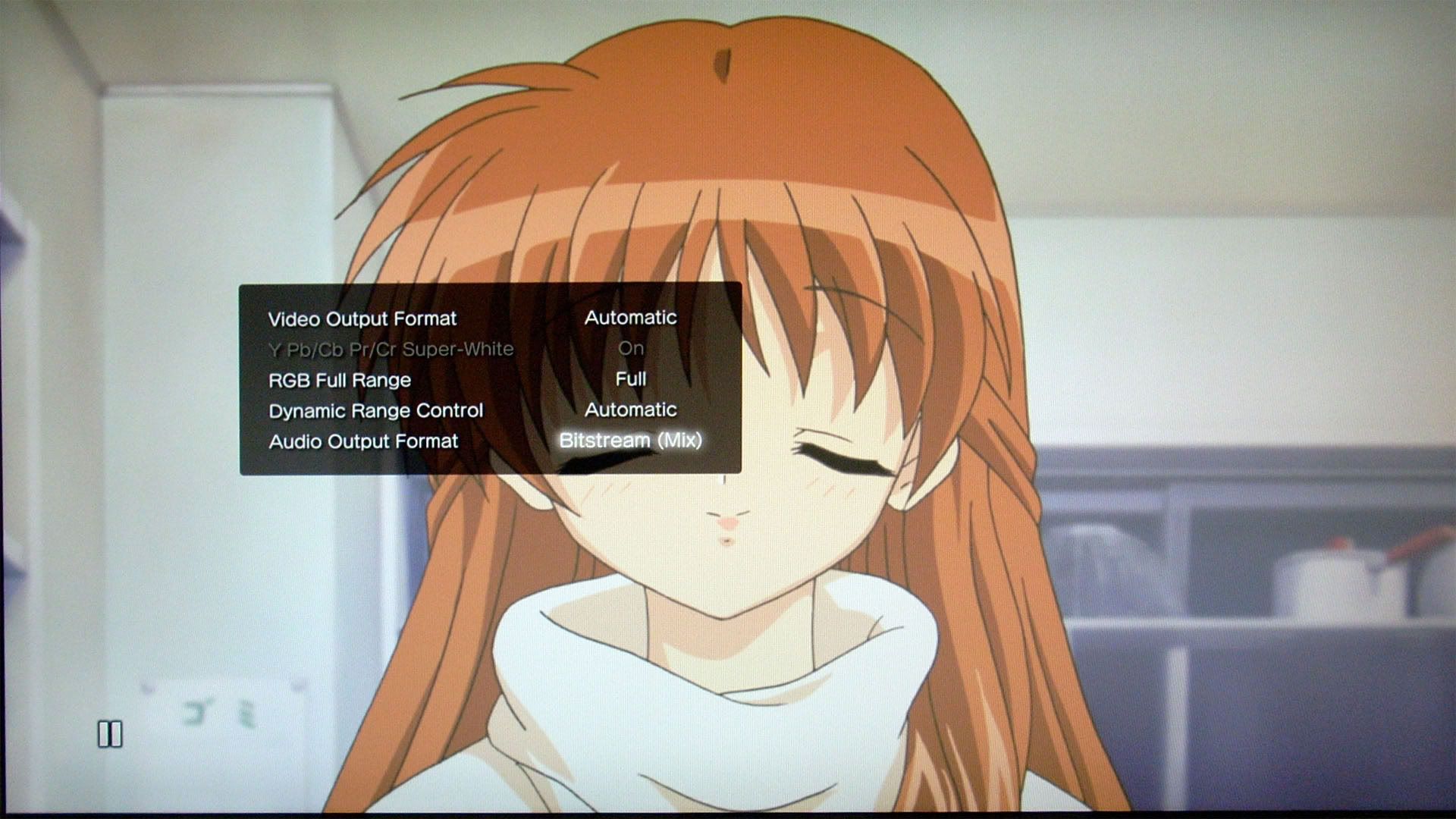
PS3 firmware 3.30 - Bitstream (Mix) detailed explanation
Well, I haven’t kept up-to-date with the PS3 firmware recently, this one is added retrospectively.
Firmware 3.30 was released on Apr 22, 2010, and the major updates are support for 3D gaming and a hidden feature: Bitstream (Mix) option for people who are still using optical out with a legacy ac3/DTS receiver.
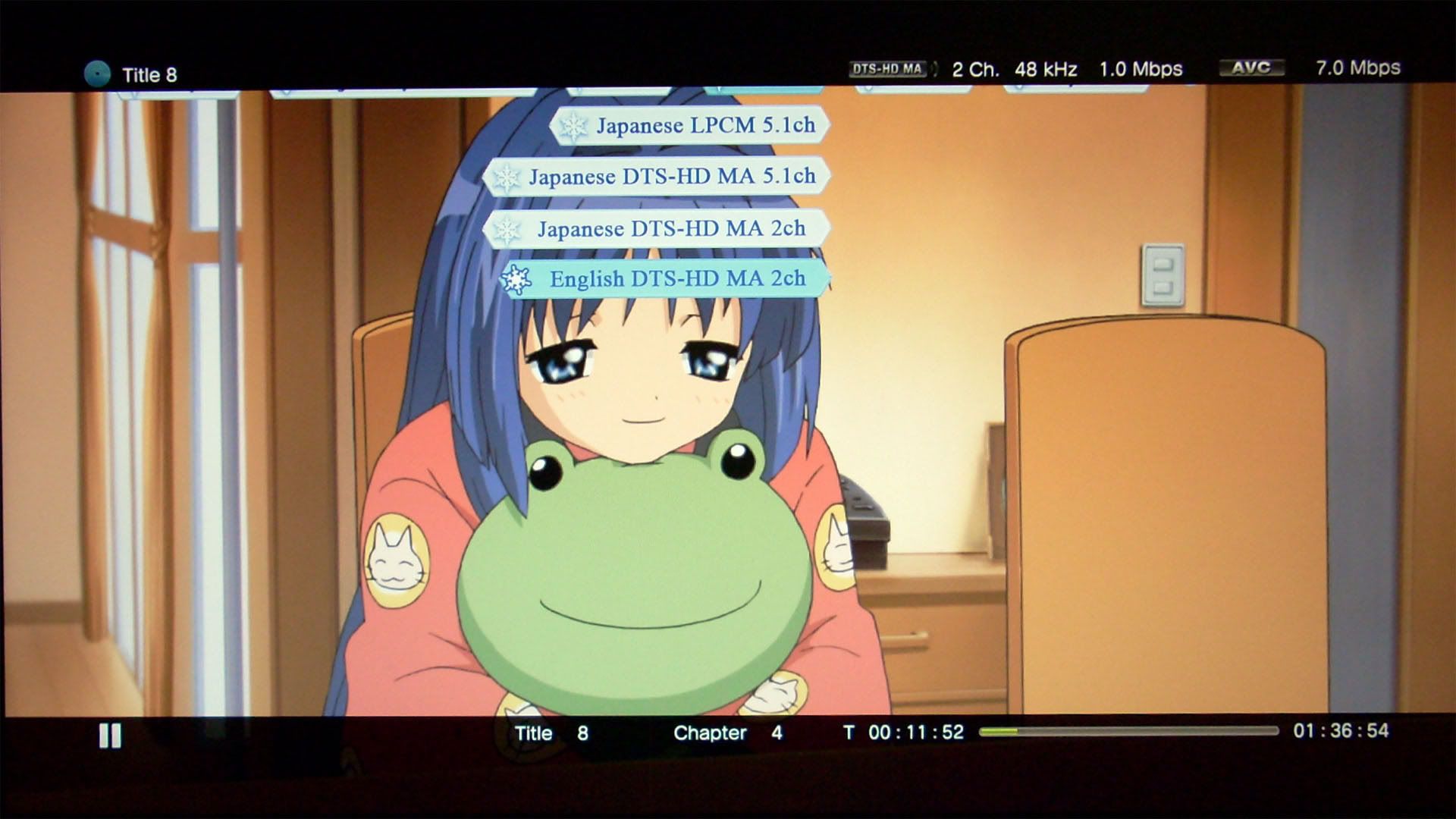
The most basic feature for Bitstream (Mix) is to provide full sound for button click and PIP secondary audio. But there’s more to it, the most beneficial thing is the ability to playback LPCM 5.1 tracks encoded in DTS 5.1 in real time. Before this update, you will never get the surround sound out of LPCM 5.1 since optical output is only capable of 2 channel LPCM, but now you will at least get the 5.1 full information. This is equivalent to the “Auto mix based on source audio” option provided in Totalmedia Theatre 3 long time ago.
PowerDVD has also provided such mixing, but it’s only limited to AC3/DTS mixing.
“Auto mix based on source audio” is a more elegant way to mix the surround sound, it differs from just AC3/DTS mixing which just lumps all audios into ac3 or DTS.
These are the behaviors I have observed:
For any 1 channel sources:
Always expands to LPCM 2.0
For any 2 channel sources:
LPCM 2.0 - decodes/retains to LPCM 2.0*
Dolby TrueHD 2.0 - decodes to LPCM 2.0
DTS-HD MA 2.0 - decodes to LPCM 2.0
(while if AC3/DTS mixing is chosen in PowerDVD or TMT3/5, these audio will be mixed into ac3 2.0 or DTS 2.0 regardless)
For the LPCM 2.0 source here, I’m not sure what PS3 exactly did, since in LPCM mode, the button sound can be heard regardless if it’s decoded or in original form. I’m guessing it’s more likely to retain the LPCM 2.0 rather than decoding for simplicity, but I could be wrong.
For any 5.1 channel sources:
LPCM 5.1 - compresses as DTS 5.1 and bitstreaming in real time (biggest benefit)
Dolby TrueHD 5.1 - compresses as Dolby Digital 5.1 and bitstreaming in real time
DTS-HD MA 5.1 - compresses as DTS 5.1 and bitstreaming in real time
Any button sound and PIP secondary audio will be mixed in.
I believe for audio more than 5.1 channels, they will be downmixed to 5.1, then compressed and bitstreamed as well. as for why Dolby TrueHD goes to Dolby Digital rather than DTS which is what I preferred, I think it maybe due to a license constraint? Also I have no way to determine what kind of bitrate these streams are compressed into. As far as the sound quality goes, you NEED to increase the volume a lot to get the same level of the audio in its original form. I think the sound is a little bit inferior to the Bitstream (direct) mode, especially the bass sounds a little mushy.
Thursday, January 20, 2011
PS3 firmware 3.50 adds incomplete 3DBD playback
In Sept 2010, Sony released firmware 3.50 to add 3DBD playback (profile 5.0). But due to the limitation of the hardware, we are really only getting “4.5” features. Here is my attempt to explain in details from an authoring standpoint of view.
In order to play 3DBD, you need an HD 3D display, active 3D glasses, and a high-speed HDMI cable (for PS3, you only need 1.3b since it doesn’t support 1.4a standards, maybe we can get an upgrade like the switch from fat to slim models which adds HD audio bitstreaming?)
Here are some Limitations on Blu-ray 3D™ disc playback from Sony:
- The 3D display of some elements such as menus and subtitles may be different on the PS3™ system than on other 3D playback devices.
- When Dolby TrueHD is selected as the audio format, audio will be output in Dolby Digital during playback of Blu-ray 3D™ content.
- When DTS-HD is selected as the audio format, audio will be output in DTS during playback of Blu-ray 3D™ content.
These are due to the PS3 has to focusing on decoding two 1080p HD streams simultaneously, it lacks the power to do any BD-J application and HD audio at the same time. This is only a PS3 limitation, the real profile 5.0 machines can do BD-J AND HD audio. In HDMV mode, the menu system doesn’t support real 3D “pop” visual effect, you can do 2D+z-depth value. Under HDMV mode, you can do upto 32 streams containing the z-depth. Sonic uses OSF format to include the parameters, the values can be accurate to frames. I believe sonic currently does NOT have a solution to create real 3D menus. The 2D can still be done in photoshop+designer PS plugin.
- Depending on the content, some BD-J (Blu-ray Disc™ Java*) features such as BONUSVIEW™ and BD-Live™ may not play in 3D or may not function properly on the PS3™ system.
Under profile 5.0 mode where you’re playing 3D titles, you don’t get PIP, multi-angle and BD-Live. But you’re getting a considerable performance gain. The menus get double amount of memory, which I assume to be 32mb for HDMV and 96mb for BD-J? The max bitrate increases from 48Mbps to 72Mbps. The MVC streams used can only be 1080p23.976, 720p60, and 720p59.94, no other combinations are allowed. In Scenarist BD, MVC have base and dependent clips. The base is the main stream, dependent clip is added as a subpath, kind of like PIP. The base can be used as a pure 2D playlist, the feature was disable in 5.5, but was later added back in 5.5.1. (I’m not sure why some retail disc has separate 2D and 3D discs…) The dependent information is the difference from the base, it is usually 50% of the size of the base. There are no I-frames in dependent stream. The dependent stream is put under the SSIF folder. Scenarist BD has a convenient feature where it can automatically generate 3D playlist using base and dependent stream (under a folder) without adding subpath manually. There are some extended PSR values to check 3D capability only available in profile 5.0 mode. I think someone said the SSIF structure uses a linux file system, that’s why under windows, we are getting double the size if we store the disc in folders, therefore it’s definitely recommended to store the disc in ISOs. When outputting a testing disc using Scenarist BD 5.5x, you’ll need to remove AACS in CPS unit, and using premastering - CMF to mux. Thre will be a ud.dat file under Dst0 folder, rename the ud.dat to ud.iso and burn. You can’t do fake AVCHD for 3DBD. These are the information I have gathered so far.
PS3 firmware 3.21->3.42->3.55 Sony desperately trying to prevent cracking the system, but only proved to be futile
I lumped these 3 firmwares into one since they pretty much are just security patches.
Firmware 3.21 was introduced on April fool’s day 2010. It was THE infamous patch that REMOVES the install otherOS feature. This also pretty much started the long battle with preventing the system from being cracked. But it only catalyzes the progress IMO since four month after, we’re greeted by some Australian vendor selling USB jailbreak device. There the firmware 3.42 was released for solely defeating this device. Not too long ago, PS3 downgrader was introduced which can be used to downgrade current firmware to lower versions to allow jailbreaking the system. And for defeating this, Sony released firmware 3.55. But shortly after Geohot the original hacker who is pretty much responsible of the removing of install otherOS feature came back with releasing PS3’s master key, which marks the day that PS3 system is totally cracked.
Monday, September 6, 2010
BD Live / Playstation 3 FW 2.50/2.52 / Live with PlayStation / Home Beta
Ehh, a bunch of stuff here... First have to mention that Playstation 3 has been on fw 2.50/2.52 for about a month now, never got around to post some screenshots for this update... Quite a few features have been added, but it doesn't have big impact on home theatre area, therefore I'm not bothered with this update.
Two big features in this updates are:
1. You can now turn off PS3 or the controller within a designated period time: 10 min, 20 min, etc
2. Video can now played sequentially, and quick scene access has been added.
So much for the firmware, then move on to live with playstation, it's the new version of folding@home, it added the ability to access google news. Other than that, it's the same as the older version, but somehow I cannot see molecule folding now...
Next is the home beta, got it on my PS3 yesterday. After experiencing it with 1 night, I think it's utterly crap... First if you use component cable, you're screwed with 480p only. Then it asks for 3G of space... After going into the home beta, I found that it's just a virtual community, kind of like the one on wii. You can currently access four places (mall, home theatre, bowling, central plaza) outside of your home, and none of these are really appealing or even functioning; stores in mall don't seem open yet, home theatre - you got to watch socom free video, the same video all day long, and not to mention the subpar video quality, bowling - you can play some small games, all generic games just to wasting your time, and central plaza has nothing going on unless you want to socialize with people. Basically, home is just a big advertisement environment for SONY.
And lastly, yesterday afternoon, I just experienced BD Live, which is another disappointing experience. I got Kung fu Panda from paramount, and Wall-E from Disney. These are the two big animation features from summer this year. I watched Wall-E first, which turned out to be mediocre at the best, better than cars and the incredibles. (forgot to mention that upon inserting the disc, it wants to download a 21MB update... I think it's mandatory, so if you don't have Internet, you might be not able to watch the disc, at least for BD Live machines??) As for the BD live Disney provided, you have to go to www.disneybdlive.com to register first, which is so hard to register, took me about half an hour to finally go thru, turns out that I have a bad screen name... After registering, I found nothing interest... Plus using a remote control chatting? Way too absurd! Next, I watched Kung fu Panda, which turns out to be a way better movie. As the BD live features, it's a lot easier to use, you don't need to register... It's more like what they provided on HD-DVD. You download some content to your local storage, then view it. Currently there are only two features, and the downloads are so small, less than 2MB, which wonders me why the f*ck they just include all the stuff on the disc, it's pointless to download!!!
Saturday, August 7, 2010
PS3 firmware 3.40/3.41 (ver.2) and Video Editor & Uploader
Trying to keep up on the PS3 updates here… So 3.40 adds Video Editor & Uploader application which allows some basic editing for the video on the hard drive and upload to youtube. 3.40 also adds support for PSN+ support. And maybe 3D?
Here’s some quick review on the Video Editor & Uploader application:
Pros:
1. Supports even Blu-ray m2ts files, somewhat better handling than Sony Vegas…
2. Easy to use, intuitive interface.
3. Pretty fast encoding (2min footage took less than 10min).
4. Easy uploading process to youtube
Cons:
1. Videos copied on HDD before 3.40 cannot be edited.
2. Function too simple, pretty much just trimming footage, and very simple text effects.
3. No HD output, only 640*480 SD resolution.
Version 3.41 is a very minor update to include the support for recommendations in PSN downloading. And yet SONY screws up. I think if you change your HDD after the update, your firmware will be corrupted. They have issued a new update, but still the same version 3.41, a bit confusing IMO.
Friday, March 26, 2010
Thoughts on PS3 firmware 3.00-3.15
Ehh, this is a long due post… Thought I’ve been catching every single firmware updates ever since I got this machine, so it’s good to keep the tradition going. But this is gonna be short since I really don’t feel there’s much change in terms of video playback in these updates: 3.00->3.01->3.10->3.15…
I’ve already forgot the main features since 3.00, but I’ll try my best here:
1. Dynamic background
2. Playstation store access shortcuts from the video and game icon
3. Multiple audio/subtitles in PSN store (never seen it implemented on any of the video…)
4. Disable fake DS3
5. Simultaneous audio output (the only useful function…)
6. upconversion on audio files to higher bit depth if AVR supports, but disables doing other tasks
7. Annoying status bar on the top right hand corner that you can’t disable
That’s pretty much it.
3.01 is a small patch to fix some broken game titles.
3.10 adds facebook support.
3.15 adds the ability of transfer files from old PS3 to new PS3 across the network.
I think that’s pretty all the stuff I remembered… Not too much is going on really…
Wednesday, May 13, 2009
PS3 FW 2.70 + tversity 1.5 report
Long time no update here. I’ve been busy playing that Valkyria Chronicles game and modifying a couple DVDs that I’ve always wanted to do. So now that portion of tasks have been finished, I’m back on track with my blog.
PS3 had a seemingly uninteresting update last month, at least all the updates are none video/audio improvements related. However, this update is pretty big to anyone who wish to play some Asian (mainly Japan and Korea) HDTV files. The update now enables to play 1920*1080i mpeg2 with 5.1 aac audio. Previously, PS3 will report unsupported format with this particular combination (no problem with 1920*1080i mpeg2 with 2.0 aac or 1440*1080i mpeg2 with 5.1 aac). This of course applies only to US firmware, I think the PS3 Asian firmware has long supported this format from the very start.
Next is the new version of tversity. With the latest version, I suddenly found out that I’m able to play menus under Blu-ray structure via DNLA streaming. Previously PS3 sees these as 10:00 clip, and will report unsupported format. Now PS3 still displays the same, but they can be played. And of course the menus are shown without any button highlights, and they are not functional.
Friday, February 6, 2009
FUN Video Port spec / PS3 firmware v2.60
Funi has their own video site, there they hosted several show in either dub or sub form (mostly sub, some has dub and both). In principal, you can only view these videos online for FREE, if you ever want to own it, you need to pay $1.99 for each episode in wmv format (not sure about the spec). But apparently bitcomet can download them in flv format for FREE (spec as below)… Never a huge fan of FUNi, but I would only recommend doing this only if the connection is slow or want to watch the videos without internet. After viewing, you should delete them… (the quality isn’t particular good that you want to store it anyway…)
General
Complete name : L:[FUNi]Gunslinger Girls 2[FUNi]Gunslinger Girl 2 - ep01.flv
Format : Flash Video
File size : 204 MiB
Duration : 25mn 18s
Overall bit rate : 1 126 Kbps
Video
Format : VP6
Duration : 25mn 17s
Bit rate : 1 000 Kbps
Width : 640 pixels
Height : 360 pixels
Display aspect ratio : 16/9
Frame rate : 23.976 fps
Bits/(Pixel*Frame) : 0.181
Audio
Format : MPEG Audio
Format version : Version 1
Format profile : Layer 3
Duration : 25mn 18s
Bit rate mode : Constant
Bit rate : 128 Kbps
Channel(s) : 2 channels
Sampling rate : 44.1 KHz
Resolution : 16 bits
The picture quality is actually NOT too bad for casual view, the average bitrate 1000kbps is good enough to support the relatively low resolution. But it’s still not as good as some experienced fansub’s work (for the same file size with a good RAW). It seems that this VP6 codec used here is NOT as efficient as xvid or x.264, probably due to its design for online streaming. The bitrate seems constant, fast scenes suffer pixelation, smearing, and a few scenes have banding. But it’s still better than youtube’s high quality setting. And for the playback, VLC is recommended. I tried MPC and KMP, the two suffered bottom smearing, not sure why though, while VLC almost doesn’t exhibit this problem. The audio quality is more than sufficient though, FUNi put mostly 192K(new half season sets) or 256K(old singles) on their DVDs.
sample images:
Rico is even more evil in this sequel…
This one isn’t as good as the original done by Madhouse, but it’s still decent enough, at least on par with Noir. As by someone who got the one piece Blu-ray by FUNi, apparently FUNi has plan to put the original series on Blu-ray (along with Blue Gender). If that day comes, I’ll be happily enough to double dip (if it’s a good upgrade over the crappy quality on DVD now) since the original series is just so good (already have the original boxset with cloth scroll on wall right in front of me!).
Next info is PS3 firmware v2.60 which was released two weeks ago.
Not too much function has been added in this release. Divx 3.11 is now supported, and a new photo viewing application was provided for optional installation. I won’t take pictures again this time since I am lazy…
Thursday, November 27, 2008
BD Live / Playstation 3 FW 2.50/2.52 / Live with PlayStation / Home Beta
Ehh, a bunch of stuff here... First have to mention that Playstation 3 has been on fw 2.50/2.52 for about a month now, never got around to post some screenshots for this update... Quite a few features have been added, but it doesn't have big impact on home theatre area, therefore I'm not bothered with this update.
Two big features in this updates are:
1. You can now turn off PS3 or the controller within a designated period time: 10 min, 20 min, etc
2. Video can now played sequentially, and quick scene access has been added.
So much for the firmware, then move on to live with playstation, it's the new version of folding@home, it added the ability to access google news. Other than that, it's the same as the older version, but somehow I cannot see molecule folding now...
Next is the home beta, got it on my PS3 yesterday. After experiencing it with 1 night, I think it's utterly crap... First if you use component cable, you're screwed with 480p only. Then it asks for 3G of space... After going into the home beta, I found that it's just a virtual community, kind of like the one on wii. You can currently access four places (mall, home theatre, bowling, central plaza) outside of your home, and none of these are really appealing or even functioning; stores in mall don't seem open yet, home theatre - you got to watch socom free video, the same video all day long, and not to mention the subpar video quality, bowling - you can play some small games, all generic games just to wasting your time, and central plaza has nothing going on unless you want to socialize with people. Basically, home is just a big advertisement environment for SONY.
And lastly, yesterday afternoon, I just experienced BD Live, which is another disappointing experience. I got Kung fu Panda from paramount, and Wall-E from Disney. These are the two big animation features from summer this year. I watched Wall-E first, which turned out to be mediocre at the best, better than cars and the incredibles. (forgot to mention that upon inserting the disc, it wants to download a 21MB update... I think it's mandatory, so if you don't have Internet, you might be not able to watch the disc, at least for BD Live machines??) As for the BD live Disney provided, you have to go to www.disneybdlive.com to register first, which is so hard to register, took me about half an hour to finally go thru, turns out that I have a bad screen name... After registering, I found nothing interest... Plus using a remote control chatting? Way too absurd! Next, I watched Kung fu Panda, which turns out to be a way better movie. As the BD live features, it's a lot easier to use, you don't need to register... It's more like what they provided on HD-DVD. You download some content to your local storage, then view it. Currently there are only two features, and the downloads are so small, less than 2MB, which wonders me why the f*ck they just include all the stuff on the disc, it's pointless to download!!!
Tuesday, August 5, 2008
Playstation 3 firmware 2.4x
I should've updated this piece of news last month, but I've taken shity quality pictures for the last couple of batches. So I don't have good pictures, I'm hesitent post them...
This firmware 2.40 was initially released at the end of June, but was pulled off a day later due to the firmware bricked a few PS3s during the update. The problem was caused by users with too many files on their hard drives. I was glad that I didn't update that firmware, as I might be a victim of that since I have tons of files, pictures, mp3s, trailers, game demos, etc on the hard drive... After about a week later, an updated version 2.41 was released, and solved the problem. About a week ago, there's another firmware 2.42 released.
Most of the features in this update are useless in terms of media playing back. However, there are three minor updates in terms of media playing back.
1. Frame and Block Noise Reduction, upconversion in all videos:
Also, there's upconversion feature for BDAV discs now. It is another useless feature as we don't have Blu-ray recorders on the market right now...
2. Mini-size control panel for music:
This is another useless feature...
3. DTS-ES and DTS 96/24 for DVD-Video and DTS-ES Matrix for Blu-ray Discs are now supported.
This is a big update for people using HDMI port and have PS3 doing internal decoding, but not a huge deal for people with optical connection...
One neat feature in this update is including a "Turn Off System" button:
Now I can finally use my SONY RM-AX1400 remote control paired with Nyko PS3 dongle to turn off the system without using the PS3 BT remote.
Other updates are game related which includes accessing XMB during game and trophies.
XMB accessing during game is a long waited update by many gamers, and now it works, but somewhat slow. The operation is not sluggish, but does take some time refreshing the icons. I hope there will be more improvement, better allocating resources for later updates.