Showing posts with label Playstation 3. Show all posts

Wednesday, August 10, 2011

PS3 firmware 3.55->3.56->3.60->3.61->3.65->3.66 Nothing but Security Patches!


Haven’t updated for the firmware for quite some time, but nothing notable new features have been introduced since 3.55, because SONY has been busy combating with hackers. But thanks to that we all get some free games.

3.55 and 3.56 are pure security patches to disable jailbreak.

3.60 adds online storage (manual) and controller save setting.

3.61 forces user the PSN login password after the infamous hacking which caused the network down for almost two month.

3.65 and 3.66 are security patches as well. 3.65 is not mandatory, while 3.66 is, not sure what new has been added.

Saturday, July 2, 2011

My Playstation 3 Hard Drive Change Experience


So I finally made the decision to upgrade the Playstation 3 hard drive. I got the Hitachi travelstar 750GB drive. It’s a standard 2.5in 9.5mm height, 5400RPM drive. Unfortunately, it’s a 4k advanced format drive, which from the information gathered, the PS3 OS is supposed to not support it and have some performance issue which causes game stuttering. But still I took the bite, worst case I can always return it… My Playstation 3 was the original 60GB. I’ve been wanted to upgrade the hard drive for a while, but never made the decision until the recent PSN hacking incident where I can get a few games for free. That pushed me to switch out the hard drive, pretty in desperate of needing one. And here’s the story:

Frist found a used drive, formatted it with large fat32, and performed a backup, the went well. Then went out to get the drive, and here’s where the adventure started… The screws! I never thought the screws would cause so much trouble! Without the right size screw driver, it’s impossible to unscrew these damn 5 screws. Well, the blue screw isn’t that bad for the tool I have. But for the 4 small screws that mount the drive, it’s virtually impossible to make them move! I fought them for a good two hours, after getting tips online using the plier since I stripped two of them. After replacing the drive, I replaced the two stripped ones with the standard screws which have the rounded head and sticking out on the latching side. These two will fit into the case, on the other side, I just screwed the original ones with again the plier… The standard ones don’t fit. And I think I’ve overcome all the trouble. But no, the last step which restoring the backup failed mysteriously. I got error message 800283E7 around 21%. Upon researching, it’s probably some issues with external hard drive, or game DRM. So lessons learned, never trust the software. When backup, you should perform a system backup, AS WELL AS a manual backup. The system backup files are just a bunch of encrypted *.dat files, it’s useless since there’s no way to stripe them out… Fortunately I don’t have much loss since the original hard drive was 60GB only (an OEM seagate), and my backup size was 32GB with mostly games, mp3, and pictures. The games I can always retrieve from the downloading list. For the mp3, it’ll take a while for me to re-rip though.

The process which originally I thought was really simple, took me a whole damn day to do, and still failed miserably. It’s THE most frustrating thing I’ve encountered with my Playstation 3.

As far as the new hard drive performance, I can’t say much yet. I’ll keep updated. But right now, I’ve copied around 100GB video files onto the hard drive through TVersity’s DLNA server, and it’s been really smooth.

Tuesday, June 28, 2011

SONY VPCF13UFX/B Laptop Review 06-28-11 Update


06-28-11 Update: Some comment on the Atheros AR9287 PCI-e wireless card after switching a wireless n router. See at the back.

06-12-11 Update: It’s been another month, the laptop has been running pretty smoothly. The AC adapter seems fine for now. And almost no incident of BSOD after I figured out the driver conflicts except one incident where a kernel crash occurred one morning due to ntoskrnl.exe. But this is after almost a full month continuously running without shutting down. I’ve also upgraded the display driver to 270.61, which I had only encounter the driver kernel crashing for once. I’ve also tried encoding some video on this machine, while there’s definitely some speed boost, it’s not as significant as I had hoped. But I have to admit that my encoding parameters are quite demanding…

05-11-11 Update: First major follow up after two month and a half of heavy use. OK, bought this machine on Feb 25th, AC adapter started making constant high pitch buzzing noise on May 4th. Have to call SONY support on May 6th (Friday) to get a replacement AC adapter. Was told that it will arrive within 7 days. But received it on May 9th (Monday). That was pretty fast, but still disappointed at how unreliable the product was…

So the left is the replacement model VGP-AC19V45, the right is the original shipped model VGP-AC19V15. As you can see, the replacement is much larger, which translates to much heavier than the shipped one. But they did have the same spec (input, output). The replacement is still NOT entirely “quite”, you can hear the electronics (presumably a fan?) running if you stick your ears to it. It became more obvious in the night when everything is quite, you can hear it within a short distant. The packaging indicated that the replacement may or may not be refurbished. Upon checking, the 45 is indeed an old model that shipped with laptops manufactured last year, the 15 comes with the new ones shipped this year! One minor improvement for this replacement is that it handles the interference a lot better, you can barely hear the noise from headphone port, well, still a little during the night… So maybe the old adapter was DOA right out of the box? That’s what I want to say about the adapter for now. But I’m sure I’ll request another one AND the battery by the end of the one year limited warranty.

Another quality issue I have recently is the BSOD in Win 7 caused by drivers. The two types of BSOD I’m encountering are the netio.sys caused by the nic (not sure if it’s the Marvell Yukon gigabit or the atheros wireless) and nusb3xhc.sys caused by NEC USB 3.0 driver respectively. It would almost BSOD every single DAY, completely randomly! So I reinstalled the system from scratch, actually installed Win 7 Ultimate this time. But before that I went to the SONY website to pick up all the drivers, have to download that retarded taxi driver program… I opted to not install a lot of the unnecessary software this time, the installation is apparently smooth, every component worked fine except I didn’t install the hardware diagnose program and VAIO media gallery so that I can’t use the ASSIST and VAIO button. I didn’t install the auto update program as well since at this point I can no longer trust the “official” drivers from SONY. But as I had expected, this didn’t stop the machine from BSOD with the nusb3xhc.sys from crashing! Then I suspected it must be the “official” drivers! So I uninstalled it, and grabbed the driver from NEC directly. Now it seems to be working fine, at least for the past week I haven’t restarted the machine! I never installed the two network drivers BTW, therefore haven’t encountered any BSOD from netio.sys crashing. The atheros driver is from win7, the Marvell driver is from the manufacturer since win7 has a really old driver. So anyway, here are the drivers for NEC USB 3.0 controller (2034) [the official one from SONY is 2040 or 2041, but somehow 2034 is newer?] and Marvell Yukon gigabit (11.41.3.3).


BTW another issue I have is the Nvidia driver seems to crash from time to time, then had a kernal recovery. During the crash, there will be a split of second that the screen would go black, sort of like win7 switching from aero effect to no effect. But since this doesn’t happen too often and didn’t BSOD, I haven’t taken any action on this one. Well, the only thing I could do is to install a newer driver I guess. And hope for the best, it’s not a hardware issue! The driver from SONY (259.03) is apparently a special Tesla driver.

Also I’ve enabled Virtualization permanently in BIOS since I need to use VMware. There’s apparently very little impact on the fan noise unlike I said earlier.

04-07-11 Update: Minor follow up. Now I discovered that both running on AC or on DC battery, this machine will output some constant humming noise ALL the time, this is particularly noticeable if you are in a very quite environment. The noise comes from the power button area on the right.

When on AC, there's also the noise from headphone port which I'm fighting with since day one. However, I found that if the battery level drops below 75%, even if you're recharging (means on AC), the noise disappears! But when charging above 75%, the noise starts returning. I don’t think there is any fix on this problem except attaching an external sound card!


03-07-11 Update: I’ve got the Realtek audio mystery mostly figured out. It’s more of a problem from my environment. Mainly the interference of the noise issue is from the power supply due to my building is NOT properly wired. When attaching the power plug in, the noise IS there, but when using internal battery, the noise is NOT present! Also, the SPDIF does support ac3 and DTS pass-through, but by default it’s off. 

I’ve been looking for a laptop for some time now. So I finally decided to bring home a SONY VPCF13UFX/B last week. Got it from local retailer store with somewhat OK price. I was actually waiting for the sandy bridge ones, but this Sony seems nice and have all the features I want. So I splurged some money on it, $800+tax to be exact, the most –expensive laptop I’ve ever bought so far.

Specifications:

Operating System: Genuine Windows® 7 Home Premium 64-bit

Processor: Intel® Core™ i7-740QM, 1.73GHz with Turbo Boost Technology up to 2.93GHz, 6MB Cache

Graphics: NVIDIA® GeForce® 310M with 512MB dedicated video RAM

Memory: 4GB DDR3 SDRAM Memory, Max supported = 8GB

Storage Drive: 500GB SATA Hard Drive

Optical Drive: DVD-Super Multi Drive

Display: 16.4" Display, 1600x900 resolution

Audio: Intel® High Definition Audio with Dolby® Home Theater Technology

Webcam: Built-in MOTION EYE® camera and microphone

Communications: 10baseT/100baseTX/1000baseT, Bluetooth with Integrated Stereo A2DP (2.1 + EDR), Atheros® 802.11b/g/n

Expandability: Memory Stick® Media Slot: 1, Express Card®/34 Slot: 1, Secure Digital (SD) Slot: 1

Ports: Headphone Jack: 1, Microphone Input: 1, VGA Output(s): 1, e-SATA: 1, HDMI™ Output(s): 1, USB 2.0: 1, USB 3.0: 2

Battery: Standard Lithium-Ion (5000 mAh)

Software:

Microsoft® Office Starter with reduced-functionality versions of Word and Excel, VAIO Care™, Media Gallery™ , PMB - VAIO Edition, Norton Internet Security™ 2011 30-Day Trial Offer

Photobucket

Some highlights are i7 740QM processor with quad-core 8 threads, 16.4” with 1600*900 resolution, Nvidia GF310M dedicated video card with HDMI output, 500GB 7200RPM Hitachi HDD, 2 USB 3.0 ports, 1 USB/eSATA port, backlit keyboard, bluetooth, crappy realtek HD audio with SPDIF digital output (shared with headphone), which are basically the things pushed me over to make the purchase. Another reason I got a SONY is because the PS3 leaves a very good impression, I hope this second big SONY product could work magic for the another time.

So here is my initial impression about the machine after a week of use.

Wednesday, June 8, 2011

PSN free 2 game downloading issue and solution


This could be quite helpful, if you have issues with downloading the free 2 game from the welcome package, try this:

1. On your PlayStation 3 or PlayStation Portable navigate to the PlayStation Network icon on the XMB
2. Log into your PlayStation Network account and choose Account Management > Transaction Management > Services List
3. Choose “PlayStation Network Promotions” from the list of services displayed
4. Select either “PS3 Free Games” or “PSP Free Games” and then choose “Select Content”

My issue was I only downloaded my first free game, then when I log back to my PSN the next day, I can access the free game selection section, but I can’t see anything listed there. Very weird. But the service list trick solves my problem!

Also remember to get the free 2 PSP game even if you don’t have a PSP. Who knows if you might have a PSP or Vita someday in the future, they are free, all you need to do is just keep them in the downloading list. I think you can download the same file upto 6 times?

BTW I got dead nation and Super Stardust HD. I’ve already finished dead nation with the Braindead level (easiest). The game is pretty short, but quite fun. It could go pretty insane at times with so many zombies! But the optimization must be quite decent, since the loading is quite fast (talking to you, might&magic…) and the frames rarely drop due to intense graphics which I was quite amazed. Super Stardust HD, I’ve always wanted this game, but it’s a tough game…

Monday, April 18, 2011

Playstation 3 Music DSD Disc Testing


I stumbled upon the this website all you need to know about SONY’s SACD format. I know the fat PS3, at least the launch models was capable of playing SACD. But this is the first time I’ve heard that PS3 is capable of playing yet another audio format called DSD. And all PS3 models are supported.

Photobucket
 
The DSD format is actually pretty open, it is stored on DVDs (any type, file system has to be UDF 1.02). It is the equivalent of CD to CD-R as of SACD to DSD. The file format is *.dsf, supports ID3v2 tags and unicode naming. DSD uses 1 bit sampling at 2.8224Mhz, which is 64 times the 44.1Khz CD uses. The resulting file size is around 300MB for a 5min song. The *.dsf file supports 2ch ONLY, which is stripped from SACD’s *.dff format which supports 5.1ch. It uses *.ddp playlist. There’s no limit on the number of playlist, however, only 255 songs can be read from players.


Here is a file structure diagram:
 
image
 
Photobucket
 
Wheatus is offering free samples HERE. But unfortunately the playlist is NOT read by PS3?Or optionally, you can create your own music with KORG’s Audiogate software.
 
Here is the quick spec written back in 2006, pretty outdated…

Wednesday, March 16, 2011

Playstation 3 as a media hub - how good is it? Part I -- Official bluetooth remote control review (03-16-11 Using PS3 Bluetooth remote control on PC)


91fa8e61.jpg picture by linkai8424

03-16-11 Update: Using PS3 remote control on PC

So you've seen my background on this page changed to Playstation 3 yesterday. Wondering why? 'Cause I finally took the plunge into the format war between HD-DVD and Blu-ray, got a Playstation 3 as a Blu-ray disc player and multimedia hub about 2 weeks ago... It's the $100 price cut in July and  then the get $150 credit after applying sony card combined to let me financially able to purchase one of the most expensive electronic devices in my home, plus I did some other stuff to make another $400 to compensate the remaining cost. Comes out the machine is free, provided the credit card company don't screw me up and the other $400 do come in later... (Pretty risky action, should never spend money without getting it first hand, but I can never do that since I'm rebate-addictedHot)... Fortunately mom didn't say too much about it this time maybe because her boss get his son the same item as his birthday gift..Surprised So besides the machine costs $540 after tax, what else did I get to make it running? First off, I was trying to get the DVI-HDMI handshaking working on my Samsung SyncMaster 940MW LCD TV monitor, but later desperately found out it doesn't work(some guys from European playstation forum do report  success though as long as the monitor was manufactured after May, 2006), oh, well, guess I'll just accept the fate(I called Samsung once, but the technician said the monitor's native resolution is 1440*900 and list a bunch of other resolutions for me, and he's pretty sure that 720P and 1080i/P are not supported). So I went out and got an multi-AV component cable (NOTE: using the unofficial cable voids the warranty on this machine, HERE is a horror story about it...), that costs $20... After couple days using the SIXAXIS remote controller, I got sick of using it navigating across the XMB(Xross media bar), so ordered an original Bluetooth remote controller for $18. And plus earlier before bought the PS3, ordered a fifth element blu-ray movie remastered edition for $13, so that's an extra $50 spend on the accecories... Below are some pictures for my remotes, PS3+AVR+TV remote (I scaled down for better viewing, you can click to enlarge)...

edcbd616.jpg picture by linkai8424811cdb32.jpg picture by linkai8424 2dba0dcf.jpg picture by linkai8424

14a6a5ea.jpg picture by linkai8424


The BT remote is quite thick (here is a picture I took showing a US quarter coin in front of it, it's about 1in/2.54cm thick), and the battery compartment has a very weak locking mechnism, which feels unsecure when you installed the batteries... but good thing is that the cover hasn't fell out yet... Upon first using the remote, you have to register the device, go to the XMB's settings, and follow the instructions (if I remembered it correctly, it's push select+enter at the same time), my remote control is registered as the seventh device (In the PS3 manual, it states that PS3 can take up to seven game controllers at the same time, so this remote is set as the very last game controller-like device). There are 41 buttons on it, but most of the buttons are repetitive. Sadly the remote CANNOT be used as a game controller although it has all the buttons as seen on the SIXAXIS... Good DVD/BD buttons are "eject, Top Menu, POP UP/MENU, audio, angle, subtitle, display"(these are the quick access keys, you don't have to dig thur the XBR icons to switch streams (about switching, one annoying thing is that pressing audio/subtitle/angle switches to the next available stream immediately, my personal preference would be the same behaviour as my harman kardon DVD player, pressing once to show the current stream rather than switching immediately) and call title/main(POPUP) menus.Tongue out Also, one bad thing about the XMB is that the icons are white, if against a very bright white/yellowish backgound, you CANNOT see any of them), and all the transport keys(scan, previous, next, pause, stop, step back/forward). One key missing here is the GOTO key(at least I can't find it...) to enable inputing time and jump to it accurately, this is something even the 120X forward cannot do(PS3 gives 1.5X, 10X, 30X, 120X four variable speeds to fast forward to a certain place). After using this, I finally don't have to rely on the peculiar SIXAXIS (sorry, I'm a no gamer with a gaming consoleDisappointed)... The good thing about BT technology is that the operational range is incredible, I can still operate the machine as I stand outside of my apartment building... Bad thing is that most learning remotes only has RF and IR transmitters and receivers, which means that BT is NOT compatible with those remotes, which is a deal breaker for those home theater enthusiasts. But here I can live with using 3 remotes and 1 keyboard to control my entire AV equipment since I've tried couple learning remotes, none of them satisfies my needs (and no, no Logitech harmony please, that's a pain in the as* to set up and quite "dumb" IMO). One last thing is that the remote does NOT have backlights which is no good for dark room.

03-16-11 Update:

OK, I was playing with the windows media center yesterday, and came up with the idea that I need a remote controller for it. From the information I found online, I would need to get another remote control and USB receiver. I really don’t like to spend another $20 to get this in order to only occasionally control the PC. So accidentally I came up with the idea of how about using PS3 remote control on PC. After googling, I did find out at least two solutions for this. Since the PS3 remote control is a generic BT device, I was successfully pair it to my PC. Here is the brief process:

1. "Add" a new Bluetooth Device in Bluetooth Tray.
2. Hold down START + ENTER keys for 3 sec on the PS3 remote to begin the syncing process.
3. Select device "BD Remote Control" or "Input device"
4. Select pairing option: "Pair without using a code"
5
. Select "Don't use a passkey", then click "Next".
6. In the Device Manager should now be 2 new Human Interface Devices

Note they must show EXACTLY as these two devices! Sometimes the Bluetooth HID Device will get incorrectly recognized as HID-compliant device, which will cause the remote not working! You can remove the already installed drive in device manager, take out the batteries, re-insert, and do a re-pair, that would most likely work.

Photobucket

Also check in the Bluetooth device list to see if it has been listed:

Photobucket


After the BT remote is connected, you would have at least two choices:
1. PS3 BluMote from Ben Barron
 
PS3 BluMote is dedicated to PS3 remote only. It doesn’t give a lot of control except key configurations. But it works well for what it does. Basically these keys are emulated to keyboard keys. So they aren’t really dedicated keys, but rather having to translate to keyboard strokes. The PS button works as calling windows media center which is very nice. The only issue I had in media center is that the number keys aren’t working, a test in word reveals the number keys also combines with alphabet, kind of like a touch tone phone pad/cellphone, where you press a key, the key changes from a->b->c->2. Another minor issue is that the PS3 remote is Bluetooth only, which means it will not work with IR or RF protocols…
 
Photobucket
 
The experimental builds support remote hibernate, but as far as my testing goes, the function does not work. I’m also puzzled why the author asks the users to test it rather than he tests it before even releasing it…


Eventghost is more for hardcore people. The PS3 remote control support is from a plug-in. My initial testing is that I wasn’t able to make it working, so I have to give up after 10min. It supposedly to support the Bluetooth hibernate function by installing Broadcom’s Widcomm stack over the default MS stack. But some people are reporting problems with setting up during the pairing stage where it won’t let you pair without code… Anyways, since I got PS3 BluMote to work, I wasn’t too keen to play around with eventghost…
 

Wednesday, February 16, 2011

Rebuilding database to solve PS3 Error 8003041C


This is a solution copied from avforum (NOT to be confused with avsforum) to solve PS3’s 8003041C error when bulk copying mp3 files to internal HDD. It DOES NOT require reformating your HDD, you only lose folder names and audio playlists, all data are retained!

Follow these steps and all your problems (including left-over ghost files) will be solved. NONE OF YOUR FILES WILL BE DELETED, DON'T WORRY. YOU DO NOT NEED TO REFORMAT!


1. Turn off your PS3
2. Press and hold the power button to turn it on. Keep holding it. It will beep once after a moment, then beep again a moment later and turn itself off.
3. Do this again. It'll beep once after a moment, but unlike before, a moment later it will beep twice quickly.
4. As soon as you hear the double beep, let up. The PS3 will ask you to connect a controller via a USB cable and press the PS button. Do so.
5. You'll be at the PS3 restore menu. First thing you need to do is hit option 3, Restore File System.
6. After selecting this, the GameOS will restart and give you a message saying something along the lines of your file system is corrupted and needs to be restored. Let it do so, and wait till you're back at the XMB. The file system corruption will be cleared up and you can now copy music and videos without getting ghost files. However, existing ghost files will still be there, so you'll need to continue the next step.
7. Start over at step 1, and follow it to step 5.
8. You're at the PS3 restore menu again. This time you hit option 4, Rebuild Database.
9. After selecting this, the GameOS will restart once again as it did with the file system restoration, except this time it will rebuild the hard drive's entire database. Wait for it to finish.
10. Done! Ghost files will either be gone if they were connected to a file that no longer existed, or they will now be accessible if there was a file that still did exist. The only problem you'll have is rebuilding the database will delete all of your messages, playlists (just the playlists, not the files themselves), and so on. You'll need to re-add all of your tags to your files under Information again for sorting, but that's it.

Monday, February 7, 2011

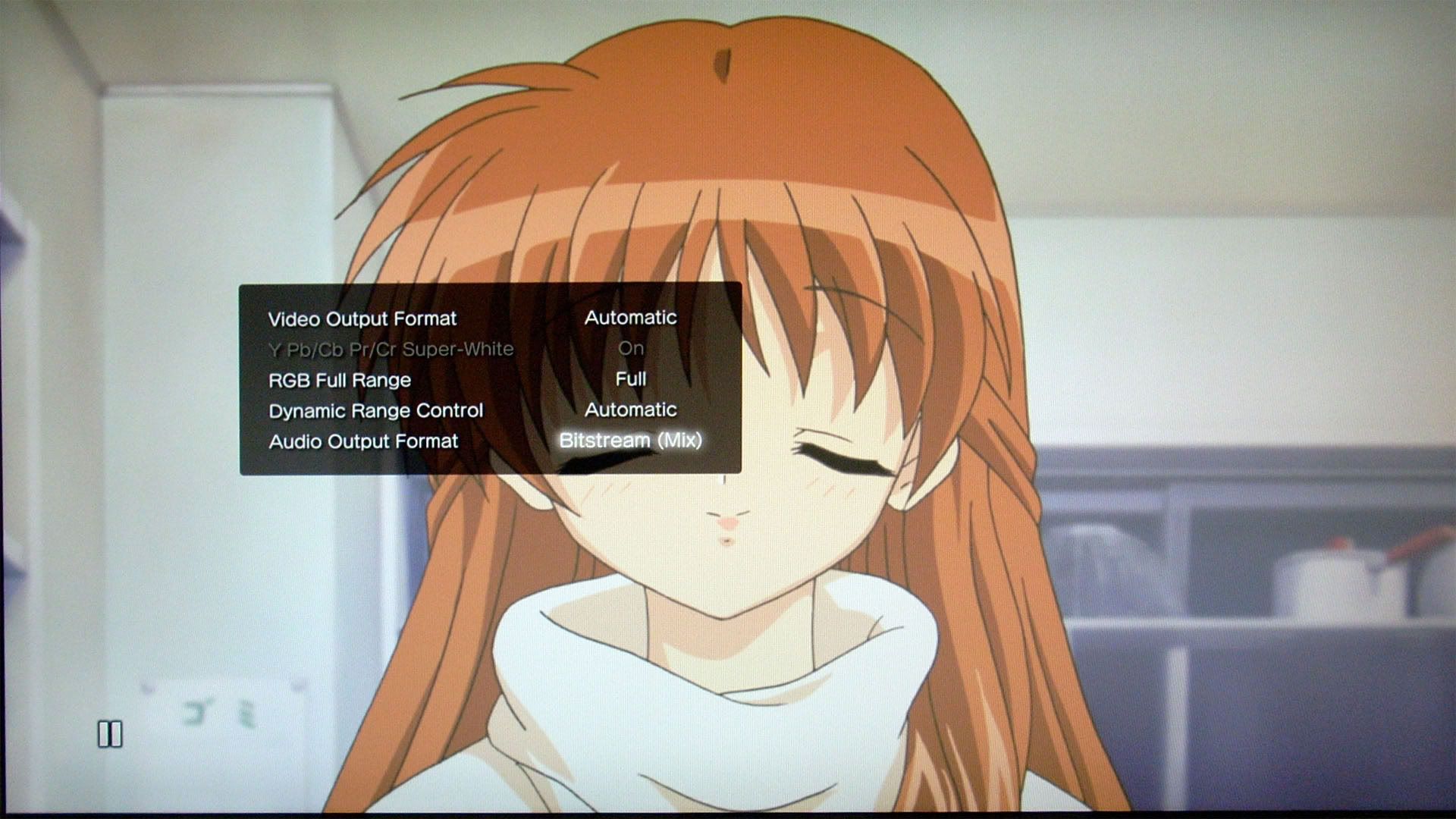
PS3 firmware 3.30 - Bitstream (Mix) detailed explanation


Well, I haven’t kept up-to-date with the PS3 firmware recently, this one is added retrospectively.

Firmware 3.30 was released on Apr 22, 2010, and the major updates are support for 3D gaming and a hidden feature: Bitstream (Mix) option for people who are still using optical out with a legacy ac3/DTS receiver.

PS3_BD-RE testing2_bitstrem mix

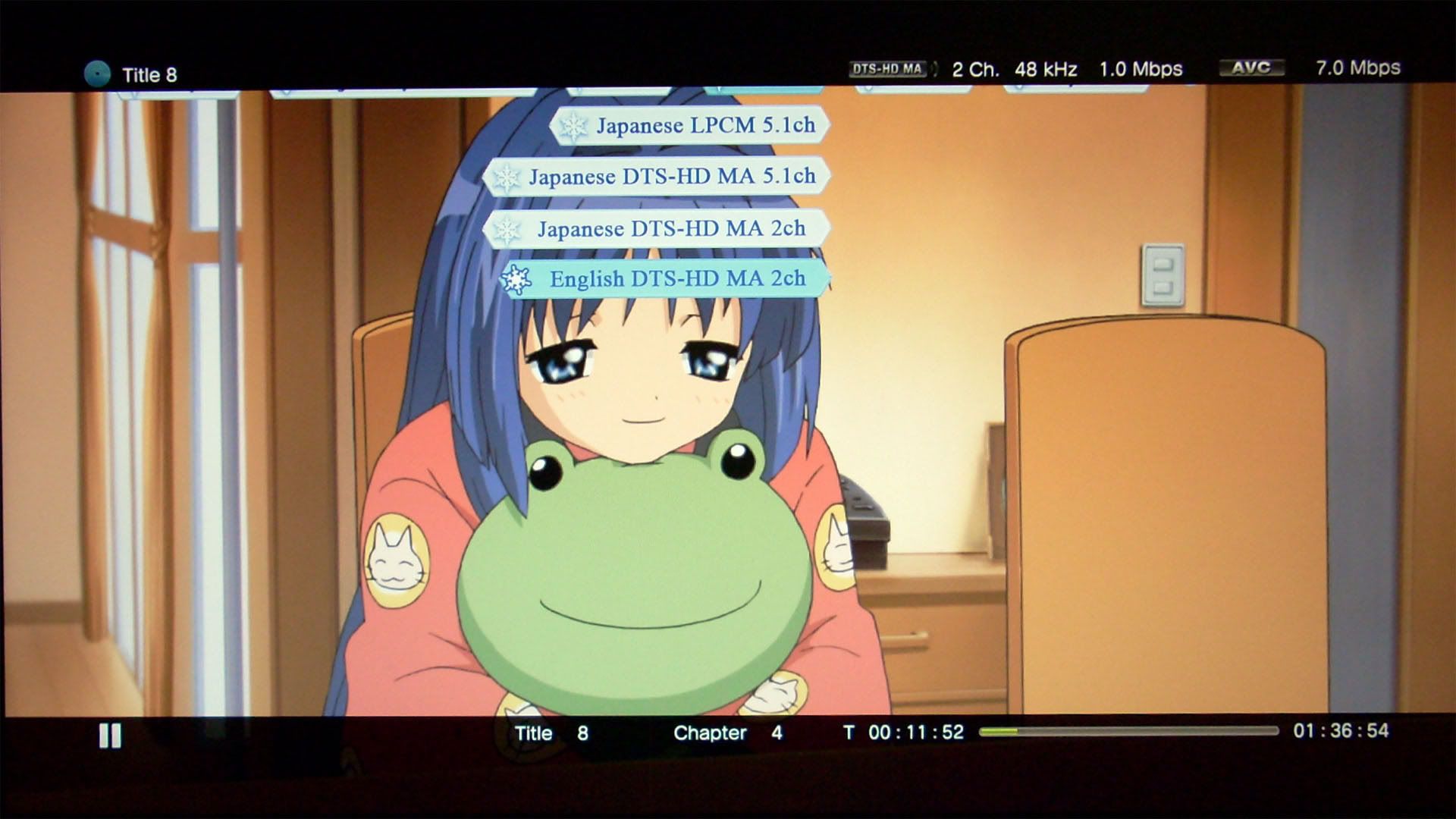
The most basic feature for Bitstream (Mix) is to provide full sound for button click and PIP secondary audio. But there’s more to it, the most beneficial thing is the ability to playback LPCM 5.1 tracks encoded in DTS 5.1 in real time. Before this update, you will never get the surround sound out of LPCM 5.1 since optical output is only capable of 2 channel LPCM, but now you will at least get the 5.1 full information. This is equivalent to the “Auto mix based on source audio” option provided in Totalmedia Theatre 3 long time ago.

image

image

PowerDVD has also provided such mixing, but it’s only limited to AC3/DTS mixing.

PS3_BD-RE testing2_bitstrem mix2

“Auto mix based on source audio” is a more elegant way to mix the surround sound, it differs from just AC3/DTS mixing which just lumps all audios into ac3 or DTS.

These are the behaviors I have observed:

For any 1 channel sources:

Always expands to LPCM 2.0

For any 2 channel sources:

LPCM 2.0 - decodes/retains to LPCM 2.0*
Dolby TrueHD 2.0 - decodes to LPCM 2.0
DTS-HD MA 2.0 - decodes to LPCM 2.0

(while if AC3/DTS mixing is chosen in PowerDVD or TMT3/5, these audio will be mixed into ac3 2.0 or DTS 2.0 regardless)

For the LPCM 2.0 source here, I’m not sure what PS3 exactly did, since in LPCM mode, the button sound can be heard regardless if it’s decoded or in original form. I’m guessing it’s more likely to retain the LPCM 2.0 rather than decoding for simplicity, but I could be wrong.

For any 5.1 channel sources:

LPCM 5.1 - compresses as DTS 5.1 and bitstreaming in real time (biggest benefit)
Dolby TrueHD 5.1 - compresses as Dolby Digital 5.1 and bitstreaming in real time
DTS-HD MA 5.1 - compresses as DTS 5.1 and bitstreaming in real time

Any button sound and PIP secondary audio will be mixed in.

I believe for audio more than 5.1 channels, they will be downmixed to 5.1, then compressed and bitstreamed as well. as for why Dolby TrueHD goes to Dolby Digital rather than DTS which is what I preferred, I think it maybe due to a license constraint? Also I have no way to determine what kind of bitrate these streams are compressed into. As far as the sound quality goes, you NEED to increase the volume a lot to get the same level of the audio in its original form. I think the sound is a little bit inferior to the Bitstream (direct) mode, especially the bass sounds a little mushy.

Thursday, January 20, 2011

PS3 firmware 3.50 adds incomplete 3DBD playback


In Sept 2010, Sony released firmware 3.50 to add 3DBD playback (profile 5.0). But due to the limitation of the hardware, we are really only getting “4.5” features. Here is my attempt to explain in details from an authoring standpoint of view.

In order to play 3DBD, you need an HD 3D display, active 3D glasses, and a high-speed HDMI cable (for PS3, you only need 1.3b since it doesn’t support 1.4a standards, maybe we can get an upgrade like the switch from fat to slim models which adds HD audio bitstreaming?)

Here are some Limitations on Blu-ray 3D™ disc playback from Sony:

  • The 3D display of some elements such as menus and subtitles may be different on the PS3™ system than on other 3D playback devices.
    • When Dolby TrueHD is selected as the audio format, audio will be output in Dolby Digital during playback of Blu-ray 3D™ content.
    • When DTS-HD is selected as the audio format, audio will be output in DTS during playback of Blu-ray 3D™ content.

These are due to the PS3 has to focusing on decoding two 1080p HD streams simultaneously, it lacks the power to do any BD-J application and HD audio at the same time. This is only a PS3 limitation, the real profile 5.0 machines can do BD-J AND HD audio. In HDMV mode, the menu system doesn’t support real 3D “pop” visual effect, you can do 2D+z-depth value. Under HDMV mode, you can do upto 32 streams containing the z-depth. Sonic uses OSF format to include the parameters, the values can be accurate to frames. I believe sonic currently does NOT have a solution to create real 3D menus. The 2D can still be done in photoshop+designer PS plugin.

  • Depending on the content, some BD-J (Blu-ray Disc™ Java*) features such as BONUSVIEW™ and BD-Live™ may not play in 3D or may not function properly on the PS3™ system.

Under profile 5.0 mode where you’re playing 3D titles, you don’t get PIP, multi-angle and BD-Live. But you’re getting a considerable performance gain. The menus get double amount of memory, which I assume to be 32mb for HDMV and 96mb for BD-J? The max bitrate increases from 48Mbps to 72Mbps. The MVC streams used can only be 1080p23.976, 720p60, and 720p59.94, no other combinations are allowed. In Scenarist BD, MVC have base and dependent clips. The base is the main stream, dependent clip is added as a subpath, kind of like PIP. The base can be used as a pure 2D playlist, the feature was disable in 5.5, but was later added back in 5.5.1. (I’m not sure why some retail disc has separate 2D and 3D discs…) The dependent information is the difference from the base, it is usually 50% of the size of the base. There are no I-frames in dependent stream. The dependent stream is put under the SSIF folder. Scenarist BD has a convenient feature where it can automatically generate 3D playlist using base and dependent stream (under a folder) without adding subpath manually. There are some extended PSR values to check 3D capability only available in profile 5.0 mode. I think someone said the SSIF structure uses a linux file system, that’s why under windows, we are getting double the size if we store the disc in folders, therefore it’s definitely recommended to store the disc in ISOs. When outputting a testing disc using Scenarist BD 5.5x, you’ll need to remove AACS in CPS unit, and using premastering - CMF to mux. Thre will be a ud.dat file under Dst0 folder, rename the ud.dat to ud.iso and burn. You can’t do fake AVCHD for 3DBD. These are the information I have gathered so far.

PS3 firmware 3.21->3.42->3.55 Sony desperately trying to prevent cracking the system, but only proved to be futile


ps_system_ps3_355

I lumped these 3 firmwares into one since they pretty much are just security patches.

Firmware 3.21 was introduced on April fool’s day 2010. It was THE infamous patch that REMOVES the install otherOS feature. This also pretty much started the long battle with preventing the system from being cracked. But it only catalyzes the progress IMO since four month after, we’re greeted by some Australian vendor selling USB jailbreak device. There the firmware 3.42 was released for solely defeating this device. Not too long ago, PS3 downgrader was introduced which can be used to downgrade current firmware to lower versions to allow jailbreaking the system. And for defeating this, Sony released firmware 3.55. But shortly after Geohot the original hacker who is pretty much responsible of the removing of install otherOS feature came back with releasing PS3’s master key, which marks the day that PS3 system is totally cracked.

Monday, September 6, 2010

BD Live / Playstation 3 FW 2.50/2.52 / Live with PlayStation / Home Beta


Ehh, a bunch of stuff here... First have to mention that  Playstation 3 has been on fw 2.50/2.52 for about a month now, never got around to post some screenshots for this update... Quite a few features have been added, but it doesn't have big impact on home theatre area, therefore I'm not bothered with this update.

Two big features in this updates are:
1. You can now turn off PS3 or the controller within a designated period time: 10 min, 20 min, etc
2. Video can now played sequentially, and quick scene access has been added.

So much for the firmware, then move on to live with playstation, it's the new version of folding@home, it added the ability to access google news. Other than that, it's the same as the older version, but somehow I cannot see molecule folding now...

Next is the home beta, got it on my PS3 yesterday. After experiencing it with 1 night, I think it's utterly crap... First if you use component cable, you're screwed with 480p only. Then it asks for 3G of space... After going into the home beta, I found that it's just a virtual community, kind of like the one on wii. You can currently access four places (mall, home theatre, bowling, central plaza) outside of your home, and none of these are really appealing or even functioning; stores in mall don't seem open yet, home theatre - you got to watch socom free video, the same video all day long, and not to mention the subpar video quality, bowling - you can play some small games, all generic games just to wasting your time, and central plaza has nothing going on unless you want to socialize with people. Basically, home is just a big advertisement environment for SONY.

And lastly, yesterday afternoon, I just experienced BD Live, which is another disappointing experience. I got Kung fu Panda from paramount, and Wall-E from Disney. These are the two big animation features from summer this year. I watched Wall-E first, which turned out to be mediocre at the best, better than cars and the incredibles. (forgot to mention that upon inserting the disc, it wants to download a 21MB update... I think it's mandatory, so if you don't have Internet, you might be not able to watch the disc, at least for BD Live machines??) As for the BD live Disney provided, you have to go to www.disneybdlive.com to register first, which is so hard to register, took me about half an hour to finally go thru, turns out that I have a bad screen name... After registering, I found nothing interest... Plus using a remote control chatting? Way too absurd! Next, I watched Kung fu Panda, which turns out to be a way better movie. As the BD live features, it's a lot easier to use, you don't need to register... It's more like what they provided on HD-DVD. You download some content to your local storage, then view it. Currently there are only two features, and the downloads are so small, less than 2MB, which wonders me why the f*ck they just include all the stuff on the disc, it's pointless to download!!!

Saturday, August 7, 2010

PS3 firmware 3.40/3.41 (ver.2) and Video Editor & Uploader


Trying to keep up on the PS3 updates here… So 3.40 adds Video Editor & Uploader application which allows some basic editing for the video on the hard drive and upload to youtube. 3.40 also adds support for PSN+ support. And maybe 3D?

Here’s some quick review on the Video Editor & Uploader application:

Pros:

1. Supports even Blu-ray m2ts files, somewhat better handling than Sony Vegas…
2. Easy to use, intuitive interface.
3. Pretty fast encoding (2min footage took less than 10min).
4. Easy uploading process to youtube

Cons:

1. Videos copied on HDD before 3.40 cannot be edited.
2. Function too simple, pretty much just trimming footage, and very simple text effects.
3. No HD output, only 640*480 SD resolution.

Version 3.41 is a very minor update to include the support for recommendations in PSN downloading. And yet SONY screws up. I think if you change your HDD after the update, your firmware will be corrupted. They have issued a new update, but still the same version 3.41, a bit confusing IMO.

Friday, March 26, 2010

Thoughts on PS3 firmware 3.00-3.15


ps3 fw 3.00-3.15

Ehh, this is a long due post… Thought I’ve been catching every single firmware updates ever since I got this machine, so it’s good to keep the tradition going. But this is gonna be short since I really don’t feel there’s much change in terms of video playback in these updates: 3.00->3.01->3.10->3.15…

I’ve already forgot the main features since 3.00, but I’ll try my best here:

1. Dynamic background
2. Playstation store access shortcuts from the video and game icon
3. Multiple audio/subtitles in PSN store (never seen it implemented on any of the video…)
4. Disable fake DS3
5. Simultaneous audio output (the only useful function…)
6. upconversion on audio files to higher bit depth if AVR supports, but disables doing other tasks
7. Annoying status bar on the top right hand corner that you can’t disable

That’s pretty much it.

3.01 is a small patch to fix some broken game titles.

3.10 adds facebook support.

3.15 adds the ability of transfer files from old PS3 to new PS3 across the network.

I think that’s pretty all the stuff I remembered… Not too much is going on really…

Wednesday, May 13, 2009

PS3 FW 2.70 + tversity 1.5 report


Long time no update here. I’ve been busy playing that Valkyria Chronicles game and modifying a couple DVDs that I’ve always wanted to do. So now that portion of tasks have been finished, I’m back on track with my blog.

PS3 had a seemingly uninteresting update last month, at least all the updates are none video/audio improvements related. However, this update is pretty big to anyone who wish to play some Asian (mainly Japan and Korea) HDTV files. The update now enables to play 1920*1080i mpeg2 with 5.1 aac audio. Previously, PS3 will report unsupported format with this particular combination (no problem with 1920*1080i mpeg2 with 2.0 aac or 1440*1080i mpeg2 with 5.1 aac). This of course applies only to US firmware, I think the PS3 Asian firmware has long supported this format from the very start.

Next is the new version of tversity. With the latest version, I suddenly found out that I’m able to play menus under Blu-ray structure via DNLA streaming. Previously PS3 sees these as 10:00 clip, and will report unsupported format. Now PS3 still displays the same, but they can be played. And of course the menus are shown without any button highlights, and they are not functional.

Friday, February 6, 2009

FUN Video Port spec / PS3 firmware v2.60


Funi has their own video site, there they hosted several show in either dub or sub form (mostly sub, some has dub and both). In principal, you can only view these videos online for FREE, if you ever want to own it, you need to pay $1.99 for each episode in wmv format (not sure about the spec). But apparently bitcomet can download them in flv format for FREE (spec as below)… Never a huge fan of FUNi, but I would only recommend doing this only if the connection is slow or want to watch the videos without internet. After viewing, you should delete them… (the quality isn’t particular good that you want to store it anyway…)

General
Complete name             : L:[FUNi]Gunslinger Girls 2[FUNi]Gunslinger Girl 2 - ep01.flv
Format                          : Flash Video
File size                         : 204 MiB
Duration                        : 25mn 18s
Overall bit rate               : 1 126 Kbps

Video
Format                           : VP6
Duration                         : 25mn 17s
Bit rate                           : 1 000 Kbps
Width                             : 640 pixels
Height                            : 360 pixels
Display aspect ratio         : 16/9
Frame rate                      : 23.976 fps
Bits/(Pixel*Frame)           : 0.181

Audio
Format                           : MPEG Audio
Format version                : Version 1
Format profile                  : Layer 3
Duration                          : 25mn 18s
Bit rate mode                   : Constant
Bit rate                            : 128 Kbps
Channel(s)                       : 2 channels
Sampling rate                   : 44.1 KHz
Resolution                        : 16 bits

The picture quality is actually NOT too bad for casual view, the average bitrate 1000kbps is good enough to support the relatively low resolution. But it’s still not as good as some experienced fansub’s work (for the same file size with a good RAW). It seems that this VP6 codec used here is NOT as efficient as xvid or x.264, probably due to its design for online streaming. The bitrate seems constant, fast scenes suffer pixelation, smearing, and a few scenes have banding. But it’s still better than youtube’s high quality setting. And for the playback, VLC is recommended. I tried MPC and KMP, the two suffered bottom smearing, not sure why though, while VLC almost doesn’t exhibit this problem. The audio quality is more than sufficient though, FUNi put mostly 192K(new half season sets) or 256K(old singles) on their DVDs.

sample images:

Rico is even more evil in this sequel…

This one isn’t as good as the original done by Madhouse, but it’s still decent enough, at least on par with Noir. As by someone who got the one piece Blu-ray by FUNi, apparently FUNi has plan to put the original series on Blu-ray (along with Blue Gender). If that day comes, I’ll be happily enough to double dip (if it’s a good upgrade over the crappy quality on DVD now) since the original series is just so good (already have the original boxset with cloth scroll on wall right in front of me!).

Next info is PS3 firmware v2.60 which was released two weeks ago.

Not too much function has been added in this release. Divx 3.11 is now supported, and a new photo viewing application was provided for optional installation. I won’t take pictures again this time since I am lazy…

Thursday, November 27, 2008

BD Live / Playstation 3 FW 2.50/2.52 / Live with PlayStation / Home Beta


Ehh, a bunch of stuff here... First have to mention that  Playstation 3 has been on fw 2.50/2.52 for about a month now, never got around to post some screenshots for this update... Quite a few features have been added, but it doesn't have big impact on home theatre area, therefore I'm not bothered with this update.

Two big features in this updates are:
1. You can now turn off PS3 or the controller within a designated period time: 10 min, 20 min, etc
2. Video can now played sequentially, and quick scene access has been added.

So much for the firmware, then move on to live with playstation, it's the new version of folding@home, it added the ability to access google news. Other than that, it's the same as the older version, but somehow I cannot see molecule folding now...

Next is the home beta, got it on my PS3 yesterday. After experiencing it with 1 night, I think it's utterly crap... First if you use component cable, you're screwed with 480p only. Then it asks for 3G of space... After going into the home beta, I found that it's just a virtual community, kind of like the one on wii. You can currently access four places (mall, home theatre, bowling, central plaza) outside of your home, and none of these are really appealing or even functioning; stores in mall don't seem open yet, home theatre - you got to watch socom free video, the same video all day long, and not to mention the subpar video quality, bowling - you can play some small games, all generic games just to wasting your time, and central plaza has nothing going on unless you want to socialize with people. Basically, home is just a big advertisement environment for SONY.

And lastly, yesterday afternoon, I just experienced BD Live, which is another disappointing experience. I got Kung fu Panda from paramount, and Wall-E from Disney. These are the two big animation features from summer this year. I watched Wall-E first, which turned out to be mediocre at the best, better than cars and the incredibles. (forgot to mention that upon inserting the disc, it wants to download a 21MB update... I think it's mandatory, so if you don't have Internet, you might be not able to watch the disc, at least for BD Live machines??) As for the BD live Disney provided, you have to go to www.disneybdlive.com to register first, which is so hard to register, took me about half an hour to finally go thru, turns out that I have a bad screen name... After registering, I found nothing interest... Plus using a remote control chatting? Way too absurd! Next, I watched Kung fu Panda, which turns out to be a way better movie. As the BD live features, it's a lot easier to use, you don't need to register... It's more like what they provided on HD-DVD. You download some content to your local storage, then view it. Currently there are only two features, and the downloads are so small, less than 2MB, which wonders me why the f*ck they just include all the stuff on the disc, it's pointless to download!!!

Sunday, August 31, 2008

Some weird behavior (limitations) of PS3 AND Macross series on Japanese PS3 Video store


Don't know if I have ranted about this weird behavior PS3 has: if mpeg with aac audio is muxed, the playback depends on the resolution of the video. If the video has a 1440*1080 resolution, the file plays; if the video has a 1920*1080 resolution, the file is "corrupt" as reported by PS3. Guess I'll have to just wait and see if they'll fix it in the future firmware (Not likely though), but they did give me DD5.1 output on XMB and fixed playback issue for my CBS recorded files.

Next limitation I have encountered recently is the amount of external media storage devices. After I insert a fourth media storage device, the PS3 complains that it has reached its maximum media storage device, and prompts me to remove one. The exact wording is "You have reached the limit on the number of storage media device. Remove a storage media device to continue." But I didn't remove any devices, and all of them seems to be working fine, at least had no problem of reading, not sure about writing though...

Next is the news about Macross, the entire Macross series, yes including the latest Frontier, will be available for downloading on the Japnaese PS3 video store in September according to this news.

These titles:

「マクロス ゼロ」/「マクロスF(フロンティア)」/「超時空要塞マクロス」/「超時空要塞マクロス 愛・おぼえていますか」/「超時空要塞マクロスII -LOVERS AGAIN-」/「マクロス7」/「マクロスプラス」/「劇場版 マクロス7 銀河がオレを呼んでいる!」/「マクロスプラス MOVIE EDITION」/「マクロス ダイナマイト7」

Which translate to:

Macross Zero
Macross F
Super Dimensional Fortress Macross
SDF Macross Do you remember love?
SDF Macross II Lovers Again
Macross 7
Macross Plus
Macross 7 the Movie "The Galaxy's calling me!"
Macross Plus "The movie Edition"
Macross Dynamite 7

Will be available on Bandai Channel.

The article didn't say if any of these will be available in HD though.

Tuesday, August 5, 2008

Playstation 3 firmware 2.4x


b8fdc595.jpg picture by linkai8424

I should've updated this piece of news last month, but I've taken shity quality pictures for the last couple of batches. So I don't have good pictures, I'm hesitent post them...

This firmware 2.40 was initially released at the end of June, but was pulled off a day later due to the firmware bricked a few PS3s during the update. The problem was caused by users with too many files on their hard drives. I was glad that I didn't update that firmware, as I might be a victim of that since I have tons of files, pictures, mp3s, trailers, game demos, etc on the hard drive... After about a week later, an updated version 2.41 was released, and solved the problem. About a week ago, there's another firmware 2.42 released.

Most of the features in this update are useless in terms of media playing back. However, there are three minor updates in terms of media playing back.

1. Frame and Block Noise Reduction, upconversion in all videos:

cb508ac9.jpg picture by linkai8424

Also, there's upconversion feature for BDAV discs now. It is another useless feature as we don't have Blu-ray recorders on the market right now...

2. Mini-size control panel for music:

199cb892.jpg picture by linkai8424

This is another useless feature...

3. DTS-ES and DTS 96/24 for DVD-Video and DTS-ES Matrix for Blu-ray Discs are now supported.

This is a big update for people using HDMI port and have PS3 doing internal decoding, but not a huge deal for people with optical connection...

One neat feature in this update is including a "Turn Off System" button:

f6eaf7fe.jpg picture by linkai8424

Now I can finally use my SONY RM-AX1400 remote control paired with Nyko PS3 dongle to turn off the system without using the PS3 BT remote.

Other updates are game related which includes accessing XMB during game and trophies.

XMB accessing during game is a long waited update by many gamers, and now it works, but somewhat slow. The operation is not sluggish, but does take some time refreshing the icons. I hope there will be more improvement, better allocating resources for later updates.


Sunday, May 18, 2008

SONY PS3 firmware 2.31/2.35 and SONY MDR-7506


3839c63a.jpg picture by linkai8424

I didn't update the picture shots with firmware 2.31 last month, now there's 2.35 released this week. Since it's a minor update, plus a little feature update, I just combined thses two together...

The firmware 2.3x brings DTS-HD master audio and disc auto resume feature update on audio/video side; a complete new PSN store, the capability of capturing game and uploading to youtube on the network side. Since I don't have an HDMI receiver, this update doesn't have any benefit... This is also the reason why I'm not so enthusiast about this update. On the DVD/Blu-ray resume feature, it sort of worked in firmware 2.20 with no resume if you're in the menu, now in firmware 2.35 it starts to play the first title if you stop in the menu previously... Not the ideal way of resuming, but better than starting all over again; blu-ray side, it still only support non bd-j titles and bd-j titles with pre-authored bd-j titles with resume support.

Screen capture from The day after tomorrow:

46096f87.jpg picture by linkai8424

Screen capture from Ice age the melt down:

eb85226d.jpg picture by linkai8424

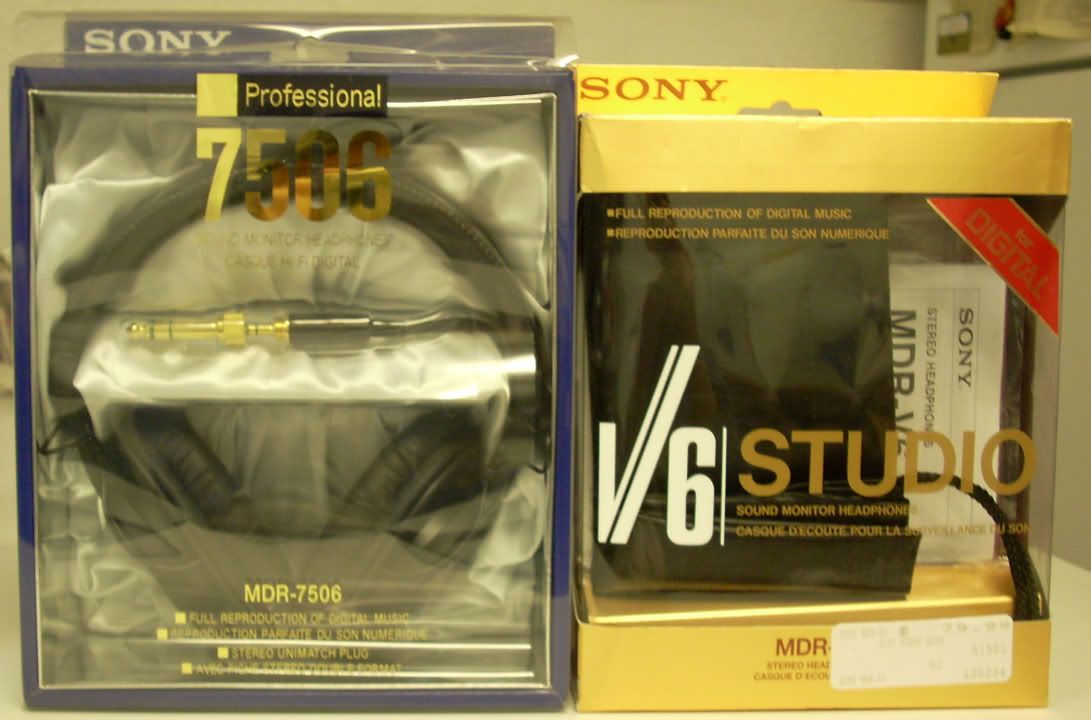
And here is SONY MDR-7506 purchased last month, got it for someone...

SONY7506.jpg picture by linkai8424

The back:

SONY7506back.jpg picture by linkai8424

7506 with my V6 side by side, although the only difference between these two is the gold plated plug on the 7506.

SONY7506_V6.jpg picture by linkai8424

ENLARGE

Tuesday, April 1, 2008

PS3 firmware 2.20 review


The ps3 firmware 2.20 has been out a while, but I'm just too lazy to put up this the review.

It is a pretty big update, the support of profile 2.0 puts ps3 the first machine that ever support this profile, all other standalones are still in profile 1.1 and none of those are upgradable to profile 2.0. The other big step forward is the support of subtitle for divx files, addition of a mosquito noise reduction filter for standard definition DVD, resume of DVD and none-java Blu-ray movie, and more interaction between ps3 and psp. To me, the best thing in this update is that they finally fixed the frame mixed up on my recorded OTA mpeg stream. This problem has been there the first day since I got my PS3. So I'm extremely glad to find out this fix which means I can finally streaming my recorded mpeg HD streams to PS3. But unfortunately after watching one episode of the recorded TV series, I somehow found out that PS3 might have applied some dynamic range compression to the ac3 sound track since the bass is definitely not there!!!

249e999b.jpg picture by linkai8424

So let's see the various features SONY has brought us in this update:

DSCN0339.jpg picture by linkai8424

First is the addition of the option "BD Internet Connection" under BD/DVD setting, it is the indication that PS3 has been upgraded to support Blu-ray Profile 2.0

DSCN0334.jpg picture by linkai8424

Then, audio output can be set to PSP or PS3. In PS3 mode, to my understanding is that PSP acts like a remote control to browse the song lists without turning on the tv, and the sound still comes out from the receiver. But ironically, due to the HDMI handshaking issue, some TVs have connection issue that requires to be turned on in order for the receiver to get the sound from PS3. So this feature is pointless for those kind of combination...

DSCN0340.jpg picture by linkai8424

Then comes the addition of Mosquito Noise Reduction filter for standard definition DVD, it is particular useful for poorly mastered material. Some people over avsforum also points out that the upscaling quality has been improved, I cannot confirm this comment.

I don't have time/device to verify how well the resume function works, but the people over avsforum has been talking about the limitation of this resume function. The general consensus is that if you just eject the disc, you'll lose ALL the memories of ALL the discs it previously remembers! The only disc I have tested is the Blue Gender Disc 1, the resume works when I stop the video in the middle, then turn off the system, I didn't go further to shut off the main switch though. The resume doesn't work when I stop the disc in the menu, when I restart, it plays fromt he beginning again... So looks like the resume function needs some more work to be perfect...

Lastly, it's the support of graphic based subtitles (XSUB and idx+sub) in divx files.

There's no support for separate srt/ssa/ass subtitle files...

The below shows how the subtitles look like. XSUB looks much like crappy DVD subtitles...

DSCN0329copy.jpg picture by linkai8424

DSCN0330.jpg picture by linkai8424

In order for PS3 to show any subtitles, you have to first mux the susbtitles into the divx files. Then turning on subtitles when playing back, the default is always off. There are two softwares that I know of that can do this muxing job, aviaddxsub orsub2divx. I've tried both software and found aviaddxsub to be a better choice, but still it won't let me configure the color and size of the outline of the subtitles.

Aviaddxsub only supports srt files, so if you have ssa or ass files, you should use subtitle workshop or similar application to convert to srt, but you'll definitely lose any animated/karaoke effects. Second, the srt files have to be ansi code. There's a detailed document here.

Aviaddxsub supports upto 8 subtitles, but in order to add different subtitles, there's naming standards, the software has poor GUI in this regard, that's what I can say...

Suppose the following naming convention:

mymovie.avi (main movie)

mymovie-1.srt (first subtitle)

mymovie-2.srt (second subtitle)

mymovie-3.srt (third subtitle)

mymovie-4.srt (fourth subtitle)

.

.

.

So you have to add 1,2,3,4... suffix to the srt file in order for the software to recognize them.

Here is the interface of the software, pretty simple to use after you figure out the naming convention:

ps3220_aviaddxsubinterface.jpg picture by linkai8424

The configuartion tab is where you need to setup the most, but they are quite intuitive to use. SUB1, SUB2... correspond to the files names above. The custom resolution is a big plus for anyone who has HD resolution divx files. Also it has the ability to break long lines rather than decrease the font size as what the sub2divx do. And it supports foreign language fonts which the sub2divx crashes every single time I try to load any Chinese fonts. The only option it is missing is the outline, you can only change the color and size of the character, but have no control on the outline, the default is black with like 1 or 2 pixel which happens to be my preference, but I would definitely appreciate if the author can add the customization option for the outline.

ps3220_aviaddxsubsetup.jpg picture by linkai8424

So overall the firmware 2.20 is a decent update, but still have a lot of room to improve. In terms of a Blu-ray player, PS3 is still currently the best choice. But in terms of a media hub, I am semi-satisfied with it's performance. If I have a choice, I would definitely get a HTPC mainly because there are still so many compatiblity issues and limitations when playing back computer based video files for the PS3.