Sunday, May 18, 2008

SONY PS3 firmware 2.31/2.35 and SONY MDR-7506


3839c63a.jpg picture by linkai8424

I didn't update the picture shots with firmware 2.31 last month, now there's 2.35 released this week. Since it's a minor update, plus a little feature update, I just combined thses two together...

The firmware 2.3x brings DTS-HD master audio and disc auto resume feature update on audio/video side; a complete new PSN store, the capability of capturing game and uploading to youtube on the network side. Since I don't have an HDMI receiver, this update doesn't have any benefit... This is also the reason why I'm not so enthusiast about this update. On the DVD/Blu-ray resume feature, it sort of worked in firmware 2.20 with no resume if you're in the menu, now in firmware 2.35 it starts to play the first title if you stop in the menu previously... Not the ideal way of resuming, but better than starting all over again; blu-ray side, it still only support non bd-j titles and bd-j titles with pre-authored bd-j titles with resume support.

Screen capture from The day after tomorrow:

46096f87.jpg picture by linkai8424

Screen capture from Ice age the melt down:

eb85226d.jpg picture by linkai8424

And here is SONY MDR-7506 purchased last month, got it for someone...

SONY7506.jpg picture by linkai8424

The back:

SONY7506back.jpg picture by linkai8424

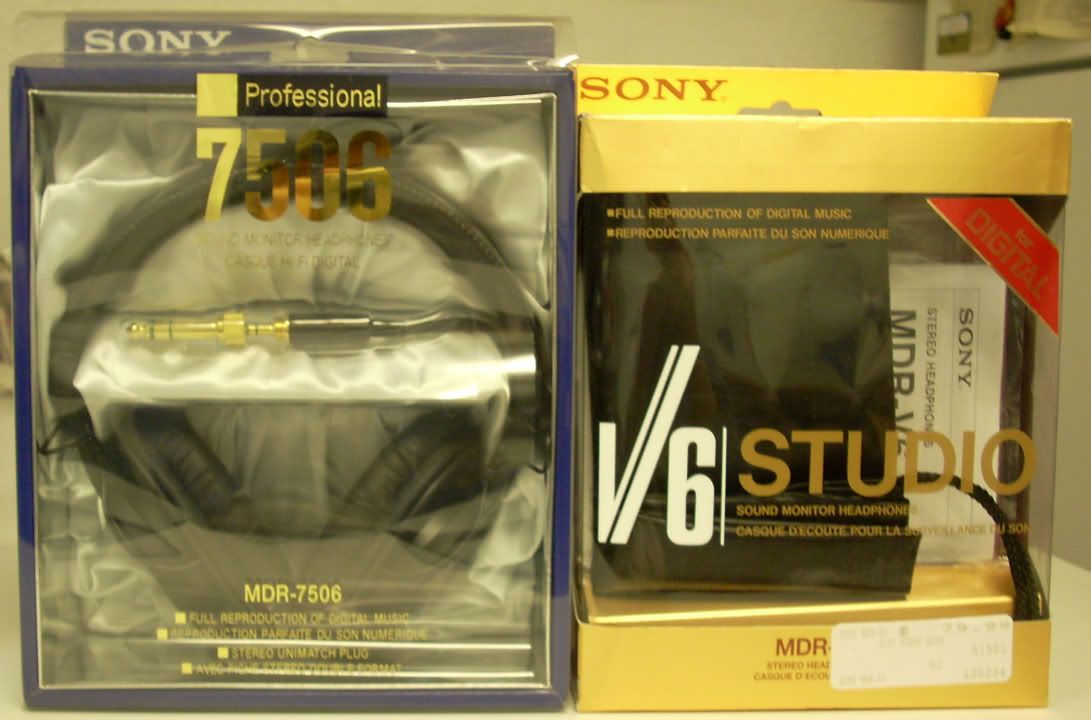
7506 with my V6 side by side, although the only difference between these two is the gold plated plug on the 7506.

SONY7506_V6.jpg picture by linkai8424

ENLARGE

Tuesday, April 1, 2008

PS3 firmware 2.20 review


The ps3 firmware 2.20 has been out a while, but I'm just too lazy to put up this the review.

It is a pretty big update, the support of profile 2.0 puts ps3 the first machine that ever support this profile, all other standalones are still in profile 1.1 and none of those are upgradable to profile 2.0. The other big step forward is the support of subtitle for divx files, addition of a mosquito noise reduction filter for standard definition DVD, resume of DVD and none-java Blu-ray movie, and more interaction between ps3 and psp. To me, the best thing in this update is that they finally fixed the frame mixed up on my recorded OTA mpeg stream. This problem has been there the first day since I got my PS3. So I'm extremely glad to find out this fix which means I can finally streaming my recorded mpeg HD streams to PS3. But unfortunately after watching one episode of the recorded TV series, I somehow found out that PS3 might have applied some dynamic range compression to the ac3 sound track since the bass is definitely not there!!!

249e999b.jpg picture by linkai8424

So let's see the various features SONY has brought us in this update:

DSCN0339.jpg picture by linkai8424

First is the addition of the option "BD Internet Connection" under BD/DVD setting, it is the indication that PS3 has been upgraded to support Blu-ray Profile 2.0

DSCN0334.jpg picture by linkai8424

Then, audio output can be set to PSP or PS3. In PS3 mode, to my understanding is that PSP acts like a remote control to browse the song lists without turning on the tv, and the sound still comes out from the receiver. But ironically, due to the HDMI handshaking issue, some TVs have connection issue that requires to be turned on in order for the receiver to get the sound from PS3. So this feature is pointless for those kind of combination...

DSCN0340.jpg picture by linkai8424

Then comes the addition of Mosquito Noise Reduction filter for standard definition DVD, it is particular useful for poorly mastered material. Some people over avsforum also points out that the upscaling quality has been improved, I cannot confirm this comment.

I don't have time/device to verify how well the resume function works, but the people over avsforum has been talking about the limitation of this resume function. The general consensus is that if you just eject the disc, you'll lose ALL the memories of ALL the discs it previously remembers! The only disc I have tested is the Blue Gender Disc 1, the resume works when I stop the video in the middle, then turn off the system, I didn't go further to shut off the main switch though. The resume doesn't work when I stop the disc in the menu, when I restart, it plays fromt he beginning again... So looks like the resume function needs some more work to be perfect...

Lastly, it's the support of graphic based subtitles (XSUB and idx+sub) in divx files.

There's no support for separate srt/ssa/ass subtitle files...

The below shows how the subtitles look like. XSUB looks much like crappy DVD subtitles...

DSCN0329copy.jpg picture by linkai8424

DSCN0330.jpg picture by linkai8424

In order for PS3 to show any subtitles, you have to first mux the susbtitles into the divx files. Then turning on subtitles when playing back, the default is always off. There are two softwares that I know of that can do this muxing job, aviaddxsub orsub2divx. I've tried both software and found aviaddxsub to be a better choice, but still it won't let me configure the color and size of the outline of the subtitles.

Aviaddxsub only supports srt files, so if you have ssa or ass files, you should use subtitle workshop or similar application to convert to srt, but you'll definitely lose any animated/karaoke effects. Second, the srt files have to be ansi code. There's a detailed document here.

Aviaddxsub supports upto 8 subtitles, but in order to add different subtitles, there's naming standards, the software has poor GUI in this regard, that's what I can say...

Suppose the following naming convention:

mymovie.avi (main movie)

mymovie-1.srt (first subtitle)

mymovie-2.srt (second subtitle)

mymovie-3.srt (third subtitle)

mymovie-4.srt (fourth subtitle)

.

.

.

So you have to add 1,2,3,4... suffix to the srt file in order for the software to recognize them.

Here is the interface of the software, pretty simple to use after you figure out the naming convention:

ps3220_aviaddxsubinterface.jpg picture by linkai8424

The configuartion tab is where you need to setup the most, but they are quite intuitive to use. SUB1, SUB2... correspond to the files names above. The custom resolution is a big plus for anyone who has HD resolution divx files. Also it has the ability to break long lines rather than decrease the font size as what the sub2divx do. And it supports foreign language fonts which the sub2divx crashes every single time I try to load any Chinese fonts. The only option it is missing is the outline, you can only change the color and size of the character, but have no control on the outline, the default is black with like 1 or 2 pixel which happens to be my preference, but I would definitely appreciate if the author can add the customization option for the outline.

ps3220_aviaddxsubsetup.jpg picture by linkai8424

So overall the firmware 2.20 is a decent update, but still have a lot of room to improve. In terms of a Blu-ray player, PS3 is still currently the best choice. But in terms of a media hub, I am semi-satisfied with it's performance. If I have a choice, I would definitely get a HTPC mainly because there are still so many compatiblity issues and limitations when playing back computer based video files for the PS3.

Wednesday, January 16, 2008

Best rechargeable battery I've used so far - SANYO eneloop


4c8cf50d.jpg picture by linkai8424

SANYO ENELOOP Ready to use Rechargeable Battery - Pretty pricey compared to the generic ones I got from another retailer. But I think it's well worth it. The bundle here, a charger, 8 x AA, 4 x AAA, 2 C and 2 D adapter, bought form costco, cost for $26.99; whereas the generics ones usually costs only $10 for 12 AA. The advantages of these batteries are long lasting and high voltage. Long lasting so that energy stored don't go away over time, while the generic ones are horrible, have to charge again if not using within one month. High voltage, these go up to 1.30V, whereas the generic ones can only go as high as 1.25V. The advantage is very obvious for using with the digital cameras. It's taking forever for the Eneloop to drain, I can still take pictures after shooting well over 100 pictures!

Since we don't have any SANYO brand products before, this product has really established its quality. I'm looking forward to buy more SANYO products, maybe a rice cooker, maybe even a PROJECTOR, who knows.

Friday, December 21, 2007

Playstation 3 firmware 2.1 review


78822342.jpg picture by linkai8424

So the new firmware released this week. This update brings the long waited Blu-ray Profile 1.1 support, divx (xvid) and wmv (VC-1) playback capability in conjuction with some other small changes. It's a huge update for users who use PS3 mainly as a media center.

1. Video:

Blu-ray Profile 1.1 brings Picture in picture commentary and blu-wizard. Picture in picture commentary is basicly that the machine is required to be able to decode two video and audio streams simultaneously.

Here's how it looks:

324224de.jpg picture by linkai8424

This is a cool feature. But personally after I watched couple HD-DVDs with the same feature (universal's U-control), it's rather boring. I would prefer the old styled separate of the features from the main movie... The first Blu-ray disc has the PIP is Resident Evil: Extinction. The above image is from blu-ray.com.

Another feature profile 1.1 brings is the Blu-wizard, or whatever the studios like to call it. It has the ability to "remember" where you left off, and continues to play from there even if you take the disc out, power off the machine, then resume watching say three months later. This is achieved by storing the data on the machine. So here is the new BD Data Utility folder firmware 2.1 adds.

bcb9f37d.jpg picture by linkai8424

Adding divx & xvid playback capability was announced about one month ago, so it's no surprise to see it in this new update. (Actually Microsoft's XBOX 360 achieved this feature on its recent update too.) There are some restrictions on how the divx/xvid files though. First, the files can NOT be bigger than 2G, it's said to be due to the licence SONY acquired from divx company. Second, files encode with divx 3.11 can NOT be played. Third, pixels cannot be divided by 16 can NOT be played based on some users' inspection. Fortunatately, the files I've tested all played back fine! They are all streamed from PC using TVerstiy. I believe the current TVersity still think that PS3 cannot play raw divx/xvid files, thus try to convert them. My solution is to turn off the transcode here.

8007edf0.jpg picture by linkai8424

Lust Caution... Wasted my 2.5 hours just to watch an adult movie...Disappointed

df4efa22.jpg picture by linkai8424

Bourne played fine. Better yet the XMB recognise Dolby Digital and output as bitstream so that my receiver output the original DD5.1 surround sound!

6e088d5f.jpg picture by linkai8424

Sayonara zetsubou sensei also plays fine, this is the only "HD" video out of the 3 I've tested. Although it has 1280*720 res, the bitrate is rather low. I'm curious how high bitrate PS3 can support.

aa0822e1.jpg picture by linkai8424

5ef77f34.jpg picture by linkai8424

As I have tried stage6 in the PS3's browser, it cannot play any videos like youtube. I think the browser needs the divx plug-in which somehow SONY haven't added it yet. I wish some day they could have that, then we can watch some kick-a$$ quality video, or maybe even downloading to hard drive?? (youtube is just way too pathetic, I highly recommend stage6 for those who have fast internet)

Adding WMV & VC-1 playback is a liitle bit of surprise though. But think about it, since Blu-ray supports VC-1, it might be not very hard to enable this function in the XMB. I've got only one HD quality wmv video to check out, fortunately it plays. There are users report PS3 plays wmv3 and VC-1 encoded videos only, and audio has to be wmv2 or something like that or it will just report unsupported data...

4acb3512.jpg picture by linkai8424

2. Music:

Yes, firmware 2.1 also brings improvements on music. It adds a new bitmapping type, Type 3, which suppose to optimize the music playback specific to Playstation 3. I cannot tell the difference, but I think I'll stick with Type 3 from now on...

c8abbffd.jpg picture by linkai8424

a7c38fda.jpg picture by linkai8424

An unexpected, but yet the coolest thing I've ever seen in this update is the earth Visualization. Now there's some reason to listen to music on PS3, just to watch the earth rotating could get me very excited...

64729daa.jpg picture by linkai8424

Here's how the earth visualization looks like:

FlashDetection.handleEmbedCode("63a9cbae-02aa-4ead-8857-0fa06b5ded6e", '\x3cembed src\x3d\x22http\x3a\x2f\x2fwww.youtube.com\x2fv\x2fvduzOYYto8g\x26amp\x3brel\x3d0\x26amp\x3bborder\x3d0\x22 width\x3d425 height\x3d355 type\x3d\x22application\x2fx-shockwave-flash\x22 wmode\x3dopaque pluginspage\x3d\x22http\x3a\x2f\x2fwww.macromedia.com\x2fgo\x2fgetflashplayer\x22 allowscriptaccess\x3dnever allownetworking\x3dinternal\x3e', 'http\x3a\x2f\x2fsc4.sclive.net\x2f00.0.0000.0000\x2fWeb\x2fimages\x2fnoflash.gif');

Some stills I took...

566fec21.jpg picture by linkai8424

e4304725.jpg picture by linkai8424

76855718.jpg picture by linkai8424

cc6deff3.jpg picture by linkai8424

b0592977.jpg picture by linkai8424

48957236.jpg picture by linkai8424

3. Folding Home version 1.3:

There's also a separate update on folding home shorly after the firmware 2.1 released. More about folding, see HERE. One thing is that any computer, windows/linux/mac will do, you don't need a PS3 to do folding... The new functions include play music while folding and automatic shutdown.

56b58de9.jpg picture by linkai8424

It can now play music while folding, but I'm not sure how the machine can distinguish the mood/type of music...

918f46d5.jpg picture by linkai8424

Automatic shutdown can be based on project or specific amount of time.

175213ff.jpg picture by linkai8424

So many people doing folding in US...

2aec5fcb.jpg picture by linkai8424

Sunday, December 9, 2007

Bourne Ultimatum HD-DVD vs a bunch of Blu-ray movies+Kodak C613 vs Nikon L11...


14a5ab25.jpg picture by linkai8424

Got back home this weekend, Nikon L11 DC has come in finally... Compare to Kodak C613, this Nikon doesn't do any better in terms of the image quality and functionality... The Nikon doesn't have a viewfinder either, seems like the manufacturers are trying to get rid of viewfinders for all these low-end point and shoot digital cameras?? The menu system is really unintuitive on this Nikon, maybe I'm not playing with it long enough, but with the 3 brands I've tried (Nikon, Kodak, and Canon), Canon definitely has the most intuitive menu system. I feel like I need to read the manual for Nikon which I usually don't read any manuals... Nikon's build quality is a lot better than Kodak, metal alloy body feels very sturdy and looks sexy. It came with a non-standard USB cable again! Different than Kodak, so now I've got 3 USB cables for three different brands (Canon's is standard, could be used for charging my SIXAXIS controller or used for other devices)! Another thing is that it seems doesn't take rechargeables, when I put two freshly charged 1.25V into it, it starts with low battery warning, don't know why. I need to try some others when I got time... So this is a short review for Nikon L11.

And this morning, Bourne Ultimatum came in surprisingly! Ordered this HD-DVD/DVD combo from fye this time, also the second time I pre-ordered something. First time is Spiderman Trilogy Blu-ray, but that's two days before the release, last minute decision since a $50 amazon promotional gift certificate was about to expire and had nothing to buy... received way after the official release. This time I pre-ordered about a month ago, and came in 3 three days before the release date, such a great feeling to get the disc earlier than most of the people! Back to the cameras, I used both of them to take some pictures... Ironically used Nikon to take HD-DVD, and Kodak to take Blu-ray, shouldn't it be the other way around??Thinking Here is the pictures... Shrinked down to fit the browser for better viewing. The original pictures are bigger than 1MB, over the limit at photobucket which is the picture storage service I'm currently using, so unfortunately I can't post the originals for comparisons... Plus these two cameras are both low end, no point to take them seriously anyways...

Bourne Front, I don't know why I'm doing this, I could've just used my scanner to get the images, much better than the blurred images here...Eye-rolling (Nikon L11):

7f06745c.jpg picture by linkai8424

Bourne Back (Nikon L11):

3cf3991c.jpg picture by linkai8424

Blu-ray movie collections front row - mostly unopened yet, watched ones are on the back row, 25 discs plus one crappy Gundam PS3 game so far and counting (Kodak C613):

2c7129f0.jpg picture by linkai8424

Another notice is that to left of the first blu-ray is my center speaker, one of the most important components in a home theater system. Furthest to the right is DVD - Jericho, the third TV DVD Boxset I've purchased. First two being Jessica Alba's Dark Angel Season 1 and Season 2... Jericho is the first show I've followed closely since it's first broadcasting, didn't miss the first 10 episodes until had a schedule change, had to wait the DVDs... I do get a chance to record the last six episodes in Hi-def when I finally got an HDTV capture card this summer. (have to admit that compare to HD, the DVD looks like crap, sound is OK though)

Impression about Bourne Ultimatum - DVD side:

     This disc is a double sided combo disc, one side HD-DVD, the other side DVD. Since I don't have an HD-DVD player yet, I can only watch DVD side... Watched the movie this afternoon while doing rebates... Video: this transfer is a lot better than the previous two, kind of close to how a great DVD should look like (eg: Lord of the rings extended version), and do have film like looking, kind of reminds me when I watched it in the theater. Sound: as expected, the dynamic range is huge, very aggresive, loud gun shootings, fightings, and explosions while conversations are very clear even though it's only a dolby digital soundtrack. Only thing is that can't hear lots of surround sound kicking in, maybe due to I'm not sitting in the center. Seems on recently releases, dolby digitals got a lot better, I've heard quite a few impressive soundtracks using this codec such as Transformers, Ratatouille, these are getting very close to the DTS soundtracks. Extras: When the movie ends, it goes to extras menu directly, lots of extras, resembles to those on the first two Bourne movies including deleted scenes and makings of the movie, don't have time to watch those, cuz I want to watch them using the U-control feature on the HD-DVD side...

Friday, November 16, 2007

Why I think Blu-Ray should win...


Saw this post over at avsforum.com, thought it's pretty funny. Here is the title: "Why my wife thinks Blu-Ray should win..."
Here I slightly modified the subject (me instead of the wife in that post) in the sentence as my title.

Here is the ORIGNAL POST:

"

Sort of a different topic, as most of the posts anymore here are along the lines of "omg brd 4 the win!! down with hddvd it sux! Lol!!11" :-)

Coming from someone who DOESN'T CARE about the format war, who barely understands anything about resolution, bitrate, lossless audio... My Wife. She represents to me 80% of the consumers out there trying to get a grasp on the emerging HD technologies and what her Husband and his geeky friends like to call "the format war".

Background: This is meant to be a neutral topic as I was an early adopter of HD-DVD (1st week HD-DVD released the A1 I bought it), soon after we bought a XA2 early in 2007 right after release. As 1stQ 2007 went by, titles that HD-DVD studios had announced weren't anything we cared for, and Blu-Ray had a TON of titles we wanted to see. We sold the players, and bought a 60GB PS3 to play Blu-Ray discs.

After comparing the formats for 18 months now, this is what she has to say about the comparisons that we all make such a big deal about, and why she thinks Blu-Ray may have the edge in this "war".

- Studio Support:
Warner has most of the titles that we watch, and the studio which has a lot of her favorite movies that women and typical consumers seem to like. Harry Potter is coming this Christmas, thats a plus! Disney has to be the key here as well, she DOES recognize how much better most animated titles look in HD and the new Disney relases on Blu-Ray always seem to make it to the top of our Netflix Queue.

- The Discs Play (Translation: Coating on the Discs):
I cannot even BEGIN to tell you how many HD-DVD movies we had sent to us from Netflix that had just the SLIGHTEST scratch that would make the player lock up halfway through the movie. 75% of the discs we rented had some sort of minute defect that made the movie unplayable, HUGE deal when you're in the middle of the movie and it stops suddenly.

- Blu-Ray cases look prettier than the red HD-DVD ones
If you've ever had a relationship with a woman, you'll understand this...

- Retailer Support
She said that she has seen much more advertising in large retail stores. Not just Best Buy, Circuit City, etc... But stores that SHE shops at on a normal basis. Target, Wal-Mart (until recent days), Sears, etc....

- The Name
She's been back and forth on this one... But according to her Blu-Ray sounds like a much "higher end" technology than "HD-DVD". HD-DVD acccording to her sounds like an extension of the current DVD format that doesn't offer as much in the way of "breakthrough technology".

Things that she is NOT happy about:

- Price
$599 for a PS3. I could've "waited a few months" and pick up an HD player for $99 and we could've "saved all kinds of money"! She does take into consideration the fact the I do actually use the PS3 for games nowadays and that buying a 360 then an HD-DVD player wouldn't been a more expensive option... (Elite model we're talking about here!)

- Me
$25-$35 a movie, one per week, hundreds of dollars lost on early technology (XA2, PS3)

Ahh the price of being an early adopter... At any rate, thought I'd start the topic and hear how YOUR spouses/girlfriends are taking this whole "format war" and what they're opinions are. I give them a lot of credit for seeing this whole thing on a much broader sense than most of us :-).

"

______________________________________________________________

So here is my version - Why I think Blu-Ray should win...

1. From the disc authoring ponit of view, blu-ray offers much better option than HD-DVD. Both technology offers two levels of authoring, one standard, one advanced. The standard authoring mode for BD is called BDMV, and for HD-DVD is just called standard authoring... BDMV pretty much has all the new feature the high definition media (HDM) offers, mainly the pop-up menu, while HD-DVD's standard authoring mode only offers DVD level of authoring which means NO pop-up menu! This is a huge differentiate already. Then for advanced authoring mode, BD has BD-J, HD-DVD has the so-called advanced authoring. Both offer PIP commentary, yet due to limited memory HD-DVD has, a pathetic 64MB cache, when in advanced authoring mode, you have to give up the PCM track, while this is NOT a issue for BD-J. So if you get a crappy mp3 track and want to clean it up a bit and maybe mix a surround track or those impossible decoding multi-channel aac tracks, you always have the option to render them as lossless PCM, you CANNOT stick this track into HD-DVD, while this is NO problem for BD-J.(This is why we never see a single HD-DVD with the pop-up menu and PCM at the same time!) Plus not to mention the constant worries about the 64MB overflow graph, if you have lots of features you want to add, this 64MB quickly runs out! (That's why Transformers HD-DVD doesn't inclued a DolbyTrue HD track)... And then we have the bitrate limitation, BD gives 48Mbps for total data and 40Mbps dedicated for video, HD-DVD only gives 30Mbps for total data and upto 29Mbps dedicated for video. So if you have lots of angles or want to do seamless branching, it's definitely better to have more bitrates for video. (yes, I'm crazy about angles and seamless branching...)

2. Blu-ray has more studio support than HD-DVD, almost all the movies I want are in blu-ray exclusive. The only movies on HD-DVD really may finally force me to become format netrual are Universal's Bourne Trilogy and the Matrix Trilogy I got on the price mistake deals from Circuitcity back in June. (I'm only willing to pay $150 for HD-DVD hardware, could be used as an inexpensive upconversion DVD player, save the BD drive's life on PS3.)

3. Blu-ray movie cost is signicantly cheaper than HD-DVD's. There are just so many blu-ray movie sales going on recently. My blu-ray movie collection has been increasing exponentially over the last and this month. I originally had only 2 movies prior to October, but now I have 24!Surprised I don't mind people saying that the discount on Blu-ray movie is just the marketing strategy that SONY wants to beat HD-DVD software on sales number on a weekly basis by droping the price whenever there's a hit title released exclusively on HD-DVD such as Transformers and Shrek 3. The average price of BD movie I got is around $10-13, which is a very reasonable price. While look at the HD-DVD, even if they have a sale, they only have very very limited choices, usually no more than 15 titles, and the price is about $15 each. Many people make a big deal, thinking that it's the hardware price hinders more high definition players being sold, especially Blu-ray player sells double the price as HD-DVD player. But I believe the real spending starts after having the hardware, it's the $30 tag on high definition media in stores that scares most people away. Well, you might argue that you never buy any disc, only rent, but still I see lots of people buying dvds in stores (at regular price). From my Blockbuster (online and in-store) and Netflix renting experience, the quality on the rented discs is pretty bad, which may cause the hardware to fail earlier than expected. That's why I prefer buying disc rather than renting, just wait for a deal, and buy a bunch. It also fulfills my collection desire...

4. Hardware wise, blu-ray player has lots of manufacturers, including SONY, Samsung, Philips, Sharp, Pioneer, Panasonic, etc... While HD-DVD has only one manufacturer - Toshiba, or LG, if you want to count dual format player... (If looking at DVD players, Toshiba and LG are hardly the main stream brands...) The beauty of having lots of different manufacturers is that it's less prone to have the same problem that might never solved in this generation and maybe carry on to the next generation hardware since everyone understands the specifications a little bit differently (someone might even understand it wrong). So if Samsung's player has some annoying problems, you can always switch to SONY, and vice versa. While in HD-DVD player, you only have Toshiba, if they make a design flaw in their product line or maybe one particular function/feature that bothers you, you are pretty much stucked.

5. Blu-ray is for my Dad! Blu-ray still has the region code (A, B, and C), region A has North America, Central America, South America, Japan, Taiwan, North Korea, South Korea, Hong Kong and Southeast Asia. Quote form wiki:" This arrangement puts the countries of the major Blu-ray manufacturers (Japan, Korea, Malaysia) in the same region as the U.S., thus ensuring early releases of U.S. content to those markets, whereas they weren't before." Thus blu-ray movies have lots of subtitle/audio options, Chinese is one of them. Almost 2/3 of the blu-ray movies in my collection have Chinese subtitles. So now my dad can enjoy these movies! DVDs and HD-DVDs are more for the US market, only a tiny fraction of them include Chinese subtitle, the only option to get Chinese subtitles is to download from internet or decrypt the DVDs and put the translations... These practices either takes time or too much energy... Some new HD-DVDs incorporates the internet function, which one of them is downloading subtitles/audio track for the disc, I don't know how well this is gonna work out...

______________________________________________________

There is a third thought on the format war recently being popular - Blu-ray and HD-DVD neither will die, coexist is the future, just as the war between DVD-R and DVD+R. A strong reason is that both technology use 405 nm blue-violet laser, thus unlike Betamax vs VHS which has a different physical form, Blu-ray and HD-DVD discs can be used in the same drive. I think this is quite possible, but even if they coexist, I still prefer blu-ray, the better technology, just like I prefer using DVD-R for all my video archives currently.

Sunday, November 11, 2007

avsforum HD media area reopens with new rules / PS3 fw 2.0 impression


So after closing new posts for like a day or so, the avsforum has allowed new posts in the HD media area, but with more strict post rules this time, for more details, click HERE.

27fa17b4.jpg picture by linkai8424

     So I was back to home yesterday, downloaded the PS3 firmware 2.0. And have played PS3 since last night, played spiderman 2 BD, played ratchet and clank demo (again...maybe the 20th time I played it?), played motorstorm demo and of course digged thru changes on fw 2.0. On my last post, I wrote how disappointing this upgrade is, now after playing on my equipment a bit more, I'm still NOT satisfied, but there are couple interesting upgrades that certainly I liked in this firmware version. The biggest update occurs in the DLNA network media section, PS3 has finally allowed to output bitstream DD5.1 in the XMB. My receiver detects DD5.1 now, so no more downmix, certainly a good job SONY have done Smile. Now I can enjoy my recorded HDTV files in its original format if I want to play on PS3. But another issue, the wrong frame playback still exists, and it becomes even worse... I'm using Tversity as the media server program, streaming to PS3, those shows I recorded from CBS showed only about 10 seconds and then PS3 became none response at all. The worst case I have to power cycle the PS3!! First I thought it was the Tversity thing, but after I switched back the wmp, it's still the same, but instead of non response, PS3 actually showed a pause sign in the left bottom corner after 10s... So this update is good for other stations but definitely NOT for CBS Disappointed. The other big update among the media hub feature is the ability to output SACD thru optical connection via transcoding to DTS! Since I don't have a SACD, I can't confirm this on my equipment, but many users have reported successful playback, read more HERE. So these two are the major discover on the 2.0 firmware.

     Other stuff are just for gamers which I'm NOT really interested. SONY has updated their webpage, click HERE. The big update including the theme, you can download three new themes from the PSN store, none of the 3 I liked, you lost the motion wave. And HERE is the instruction how you can make a completed (icon etc...) custom theme, I'm NOT in unless someone figures how to do a motion background. If you use the original theme, you can change the background color and brightness now, it's no longer have to change according to the month, but I found it's useless. Another thing is the font, you can choose from Original,Rounded, Pop, there's very subtle changes even on the hi-def set, I prefer Rounded (maybe it's because of the Chinese calligraphy I practised since very young, I always prefer rounded style Smile). On the new RSS dashboard thing, it actually is readable on my LCD monitor, but terribly on the traditional non hi-def CRT as I seen on my suitemate's set... But still the horizontal scrolling thing bothers me a lot, reminds me of those cash registers in Chinese hospitals which there's never a line, you wanna check out fast you gotta be a football player Baring teeth... I just turn it off.

     So this is pretty much my discovery...