Wednesday, May 13, 2009

PS3 FW 2.70 + tversity 1.5 report


Long time no update here. I’ve been busy playing that Valkyria Chronicles game and modifying a couple DVDs that I’ve always wanted to do. So now that portion of tasks have been finished, I’m back on track with my blog.

PS3 had a seemingly uninteresting update last month, at least all the updates are none video/audio improvements related. However, this update is pretty big to anyone who wish to play some Asian (mainly Japan and Korea) HDTV files. The update now enables to play 1920*1080i mpeg2 with 5.1 aac audio. Previously, PS3 will report unsupported format with this particular combination (no problem with 1920*1080i mpeg2 with 2.0 aac or 1440*1080i mpeg2 with 5.1 aac). This of course applies only to US firmware, I think the PS3 Asian firmware has long supported this format from the very start.

Next is the new version of tversity. With the latest version, I suddenly found out that I’m able to play menus under Blu-ray structure via DNLA streaming. Previously PS3 sees these as 10:00 clip, and will report unsupported format. Now PS3 still displays the same, but they can be played. And of course the menus are shown without any button highlights, and they are not functional.

Friday, February 6, 2009

FUN Video Port spec / PS3 firmware v2.60


Funi has their own video site, there they hosted several show in either dub or sub form (mostly sub, some has dub and both). In principal, you can only view these videos online for FREE, if you ever want to own it, you need to pay $1.99 for each episode in wmv format (not sure about the spec). But apparently bitcomet can download them in flv format for FREE (spec as below)… Never a huge fan of FUNi, but I would only recommend doing this only if the connection is slow or want to watch the videos without internet. After viewing, you should delete them… (the quality isn’t particular good that you want to store it anyway…)

General
Complete name             : L:[FUNi]Gunslinger Girls 2[FUNi]Gunslinger Girl 2 - ep01.flv
Format                          : Flash Video
File size                         : 204 MiB
Duration                        : 25mn 18s
Overall bit rate               : 1 126 Kbps

Video
Format                           : VP6
Duration                         : 25mn 17s
Bit rate                           : 1 000 Kbps
Width                             : 640 pixels
Height                            : 360 pixels
Display aspect ratio         : 16/9
Frame rate                      : 23.976 fps
Bits/(Pixel*Frame)           : 0.181

Audio
Format                           : MPEG Audio
Format version                : Version 1
Format profile                  : Layer 3
Duration                          : 25mn 18s
Bit rate mode                   : Constant
Bit rate                            : 128 Kbps
Channel(s)                       : 2 channels
Sampling rate                   : 44.1 KHz
Resolution                        : 16 bits

The picture quality is actually NOT too bad for casual view, the average bitrate 1000kbps is good enough to support the relatively low resolution. But it’s still not as good as some experienced fansub’s work (for the same file size with a good RAW). It seems that this VP6 codec used here is NOT as efficient as xvid or x.264, probably due to its design for online streaming. The bitrate seems constant, fast scenes suffer pixelation, smearing, and a few scenes have banding. But it’s still better than youtube’s high quality setting. And for the playback, VLC is recommended. I tried MPC and KMP, the two suffered bottom smearing, not sure why though, while VLC almost doesn’t exhibit this problem. The audio quality is more than sufficient though, FUNi put mostly 192K(new half season sets) or 256K(old singles) on their DVDs.

sample images:

Rico is even more evil in this sequel…

This one isn’t as good as the original done by Madhouse, but it’s still decent enough, at least on par with Noir. As by someone who got the one piece Blu-ray by FUNi, apparently FUNi has plan to put the original series on Blu-ray (along with Blue Gender). If that day comes, I’ll be happily enough to double dip (if it’s a good upgrade over the crappy quality on DVD now) since the original series is just so good (already have the original boxset with cloth scroll on wall right in front of me!).

Next info is PS3 firmware v2.60 which was released two weeks ago.

Not too much function has been added in this release. Divx 3.11 is now supported, and a new photo viewing application was provided for optional installation. I won’t take pictures again this time since I am lazy…

Thursday, November 27, 2008

BD Live / Playstation 3 FW 2.50/2.52 / Live with PlayStation / Home Beta


Ehh, a bunch of stuff here... First have to mention that  Playstation 3 has been on fw 2.50/2.52 for about a month now, never got around to post some screenshots for this update... Quite a few features have been added, but it doesn't have big impact on home theatre area, therefore I'm not bothered with this update.

Two big features in this updates are:
1. You can now turn off PS3 or the controller within a designated period time: 10 min, 20 min, etc
2. Video can now played sequentially, and quick scene access has been added.

So much for the firmware, then move on to live with playstation, it's the new version of folding@home, it added the ability to access google news. Other than that, it's the same as the older version, but somehow I cannot see molecule folding now...

Next is the home beta, got it on my PS3 yesterday. After experiencing it with 1 night, I think it's utterly crap... First if you use component cable, you're screwed with 480p only. Then it asks for 3G of space... After going into the home beta, I found that it's just a virtual community, kind of like the one on wii. You can currently access four places (mall, home theatre, bowling, central plaza) outside of your home, and none of these are really appealing or even functioning; stores in mall don't seem open yet, home theatre - you got to watch socom free video, the same video all day long, and not to mention the subpar video quality, bowling - you can play some small games, all generic games just to wasting your time, and central plaza has nothing going on unless you want to socialize with people. Basically, home is just a big advertisement environment for SONY.

And lastly, yesterday afternoon, I just experienced BD Live, which is another disappointing experience. I got Kung fu Panda from paramount, and Wall-E from Disney. These are the two big animation features from summer this year. I watched Wall-E first, which turned out to be mediocre at the best, better than cars and the incredibles. (forgot to mention that upon inserting the disc, it wants to download a 21MB update... I think it's mandatory, so if you don't have Internet, you might be not able to watch the disc, at least for BD Live machines??) As for the BD live Disney provided, you have to go to www.disneybdlive.com to register first, which is so hard to register, took me about half an hour to finally go thru, turns out that I have a bad screen name... After registering, I found nothing interest... Plus using a remote control chatting? Way too absurd! Next, I watched Kung fu Panda, which turns out to be a way better movie. As the BD live features, it's a lot easier to use, you don't need to register... It's more like what they provided on HD-DVD. You download some content to your local storage, then view it. Currently there are only two features, and the downloads are so small, less than 2MB, which wonders me why the f*ck they just include all the stuff on the disc, it's pointless to download!!!

Sunday, August 31, 2008

Some weird behavior (limitations) of PS3 AND Macross series on Japanese PS3 Video store


Don't know if I have ranted about this weird behavior PS3 has: if mpeg with aac audio is muxed, the playback depends on the resolution of the video. If the video has a 1440*1080 resolution, the file plays; if the video has a 1920*1080 resolution, the file is "corrupt" as reported by PS3. Guess I'll have to just wait and see if they'll fix it in the future firmware (Not likely though), but they did give me DD5.1 output on XMB and fixed playback issue for my CBS recorded files.

Next limitation I have encountered recently is the amount of external media storage devices. After I insert a fourth media storage device, the PS3 complains that it has reached its maximum media storage device, and prompts me to remove one. The exact wording is "You have reached the limit on the number of storage media device. Remove a storage media device to continue." But I didn't remove any devices, and all of them seems to be working fine, at least had no problem of reading, not sure about writing though...

Next is the news about Macross, the entire Macross series, yes including the latest Frontier, will be available for downloading on the Japnaese PS3 video store in September according to this news.

These titles:

「マクロス ゼロ」/「マクロスF(フロンティア)」/「超時空要塞マクロス」/「超時空要塞マクロス 愛・おぼえていますか」/「超時空要塞マクロスII -LOVERS AGAIN-」/「マクロス7」/「マクロスプラス」/「劇場版 マクロス7 銀河がオレを呼んでいる!」/「マクロスプラス MOVIE EDITION」/「マクロス ダイナマイト7」

Which translate to:

Macross Zero
Macross F
Super Dimensional Fortress Macross
SDF Macross Do you remember love?
SDF Macross II Lovers Again
Macross 7
Macross Plus
Macross 7 the Movie "The Galaxy's calling me!"
Macross Plus "The movie Edition"
Macross Dynamite 7

Will be available on Bandai Channel.

The article didn't say if any of these will be available in HD though.

Tuesday, August 5, 2008

Playstation 3 firmware 2.4x


b8fdc595.jpg picture by linkai8424

I should've updated this piece of news last month, but I've taken shity quality pictures for the last couple of batches. So I don't have good pictures, I'm hesitent post them...

This firmware 2.40 was initially released at the end of June, but was pulled off a day later due to the firmware bricked a few PS3s during the update. The problem was caused by users with too many files on their hard drives. I was glad that I didn't update that firmware, as I might be a victim of that since I have tons of files, pictures, mp3s, trailers, game demos, etc on the hard drive... After about a week later, an updated version 2.41 was released, and solved the problem. About a week ago, there's another firmware 2.42 released.

Most of the features in this update are useless in terms of media playing back. However, there are three minor updates in terms of media playing back.

1. Frame and Block Noise Reduction, upconversion in all videos:

cb508ac9.jpg picture by linkai8424

Also, there's upconversion feature for BDAV discs now. It is another useless feature as we don't have Blu-ray recorders on the market right now...

2. Mini-size control panel for music:

199cb892.jpg picture by linkai8424

This is another useless feature...

3. DTS-ES and DTS 96/24 for DVD-Video and DTS-ES Matrix for Blu-ray Discs are now supported.

This is a big update for people using HDMI port and have PS3 doing internal decoding, but not a huge deal for people with optical connection...

One neat feature in this update is including a "Turn Off System" button:

f6eaf7fe.jpg picture by linkai8424

Now I can finally use my SONY RM-AX1400 remote control paired with Nyko PS3 dongle to turn off the system without using the PS3 BT remote.

Other updates are game related which includes accessing XMB during game and trophies.

XMB accessing during game is a long waited update by many gamers, and now it works, but somewhat slow. The operation is not sluggish, but does take some time refreshing the icons. I hope there will be more improvement, better allocating resources for later updates.


Sunday, May 18, 2008

SONY PS3 firmware 2.31/2.35 and SONY MDR-7506


3839c63a.jpg picture by linkai8424

I didn't update the picture shots with firmware 2.31 last month, now there's 2.35 released this week. Since it's a minor update, plus a little feature update, I just combined thses two together...

The firmware 2.3x brings DTS-HD master audio and disc auto resume feature update on audio/video side; a complete new PSN store, the capability of capturing game and uploading to youtube on the network side. Since I don't have an HDMI receiver, this update doesn't have any benefit... This is also the reason why I'm not so enthusiast about this update. On the DVD/Blu-ray resume feature, it sort of worked in firmware 2.20 with no resume if you're in the menu, now in firmware 2.35 it starts to play the first title if you stop in the menu previously... Not the ideal way of resuming, but better than starting all over again; blu-ray side, it still only support non bd-j titles and bd-j titles with pre-authored bd-j titles with resume support.

Screen capture from The day after tomorrow:

46096f87.jpg picture by linkai8424

Screen capture from Ice age the melt down:

eb85226d.jpg picture by linkai8424

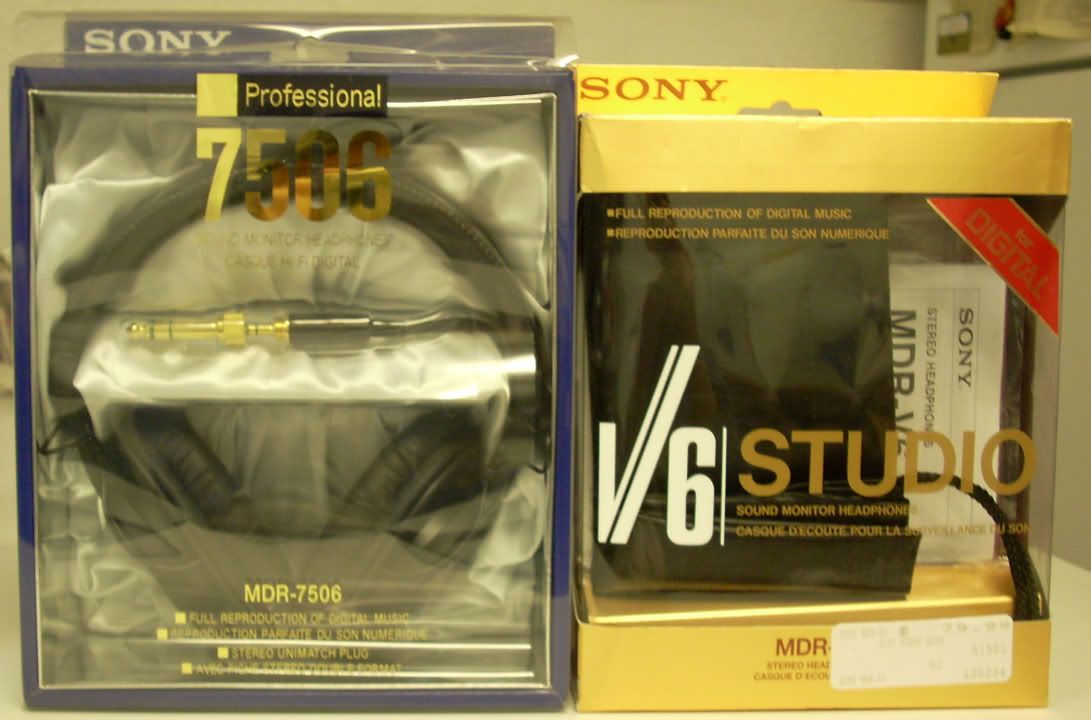
And here is SONY MDR-7506 purchased last month, got it for someone...

SONY7506.jpg picture by linkai8424

The back:

SONY7506back.jpg picture by linkai8424

7506 with my V6 side by side, although the only difference between these two is the gold plated plug on the 7506.

SONY7506_V6.jpg picture by linkai8424

ENLARGE

Tuesday, April 1, 2008

PS3 firmware 2.20 review


The ps3 firmware 2.20 has been out a while, but I'm just too lazy to put up this the review.

It is a pretty big update, the support of profile 2.0 puts ps3 the first machine that ever support this profile, all other standalones are still in profile 1.1 and none of those are upgradable to profile 2.0. The other big step forward is the support of subtitle for divx files, addition of a mosquito noise reduction filter for standard definition DVD, resume of DVD and none-java Blu-ray movie, and more interaction between ps3 and psp. To me, the best thing in this update is that they finally fixed the frame mixed up on my recorded OTA mpeg stream. This problem has been there the first day since I got my PS3. So I'm extremely glad to find out this fix which means I can finally streaming my recorded mpeg HD streams to PS3. But unfortunately after watching one episode of the recorded TV series, I somehow found out that PS3 might have applied some dynamic range compression to the ac3 sound track since the bass is definitely not there!!!

249e999b.jpg picture by linkai8424

So let's see the various features SONY has brought us in this update:

DSCN0339.jpg picture by linkai8424

First is the addition of the option "BD Internet Connection" under BD/DVD setting, it is the indication that PS3 has been upgraded to support Blu-ray Profile 2.0

DSCN0334.jpg picture by linkai8424

Then, audio output can be set to PSP or PS3. In PS3 mode, to my understanding is that PSP acts like a remote control to browse the song lists without turning on the tv, and the sound still comes out from the receiver. But ironically, due to the HDMI handshaking issue, some TVs have connection issue that requires to be turned on in order for the receiver to get the sound from PS3. So this feature is pointless for those kind of combination...

DSCN0340.jpg picture by linkai8424

Then comes the addition of Mosquito Noise Reduction filter for standard definition DVD, it is particular useful for poorly mastered material. Some people over avsforum also points out that the upscaling quality has been improved, I cannot confirm this comment.

I don't have time/device to verify how well the resume function works, but the people over avsforum has been talking about the limitation of this resume function. The general consensus is that if you just eject the disc, you'll lose ALL the memories of ALL the discs it previously remembers! The only disc I have tested is the Blue Gender Disc 1, the resume works when I stop the video in the middle, then turn off the system, I didn't go further to shut off the main switch though. The resume doesn't work when I stop the disc in the menu, when I restart, it plays fromt he beginning again... So looks like the resume function needs some more work to be perfect...

Lastly, it's the support of graphic based subtitles (XSUB and idx+sub) in divx files.

There's no support for separate srt/ssa/ass subtitle files...

The below shows how the subtitles look like. XSUB looks much like crappy DVD subtitles...

DSCN0329copy.jpg picture by linkai8424

DSCN0330.jpg picture by linkai8424

In order for PS3 to show any subtitles, you have to first mux the susbtitles into the divx files. Then turning on subtitles when playing back, the default is always off. There are two softwares that I know of that can do this muxing job, aviaddxsub orsub2divx. I've tried both software and found aviaddxsub to be a better choice, but still it won't let me configure the color and size of the outline of the subtitles.

Aviaddxsub only supports srt files, so if you have ssa or ass files, you should use subtitle workshop or similar application to convert to srt, but you'll definitely lose any animated/karaoke effects. Second, the srt files have to be ansi code. There's a detailed document here.

Aviaddxsub supports upto 8 subtitles, but in order to add different subtitles, there's naming standards, the software has poor GUI in this regard, that's what I can say...

Suppose the following naming convention:

mymovie.avi (main movie)

mymovie-1.srt (first subtitle)

mymovie-2.srt (second subtitle)

mymovie-3.srt (third subtitle)

mymovie-4.srt (fourth subtitle)

.

.

.

So you have to add 1,2,3,4... suffix to the srt file in order for the software to recognize them.

Here is the interface of the software, pretty simple to use after you figure out the naming convention:

ps3220_aviaddxsubinterface.jpg picture by linkai8424

The configuartion tab is where you need to setup the most, but they are quite intuitive to use. SUB1, SUB2... correspond to the files names above. The custom resolution is a big plus for anyone who has HD resolution divx files. Also it has the ability to break long lines rather than decrease the font size as what the sub2divx do. And it supports foreign language fonts which the sub2divx crashes every single time I try to load any Chinese fonts. The only option it is missing is the outline, you can only change the color and size of the character, but have no control on the outline, the default is black with like 1 or 2 pixel which happens to be my preference, but I would definitely appreciate if the author can add the customization option for the outline.

ps3220_aviaddxsubsetup.jpg picture by linkai8424

So overall the firmware 2.20 is a decent update, but still have a lot of room to improve. In terms of a Blu-ray player, PS3 is still currently the best choice. But in terms of a media hub, I am semi-satisfied with it's performance. If I have a choice, I would definitely get a HTPC mainly because there are still so many compatiblity issues and limitations when playing back computer based video files for the PS3.

Wednesday, January 16, 2008

Best rechargeable battery I've used so far - SANYO eneloop


4c8cf50d.jpg picture by linkai8424

SANYO ENELOOP Ready to use Rechargeable Battery - Pretty pricey compared to the generic ones I got from another retailer. But I think it's well worth it. The bundle here, a charger, 8 x AA, 4 x AAA, 2 C and 2 D adapter, bought form costco, cost for $26.99; whereas the generics ones usually costs only $10 for 12 AA. The advantages of these batteries are long lasting and high voltage. Long lasting so that energy stored don't go away over time, while the generic ones are horrible, have to charge again if not using within one month. High voltage, these go up to 1.30V, whereas the generic ones can only go as high as 1.25V. The advantage is very obvious for using with the digital cameras. It's taking forever for the Eneloop to drain, I can still take pictures after shooting well over 100 pictures!

Since we don't have any SANYO brand products before, this product has really established its quality. I'm looking forward to buy more SANYO products, maybe a rice cooker, maybe even a PROJECTOR, who knows.

Friday, December 21, 2007

Playstation 3 firmware 2.1 review


78822342.jpg picture by linkai8424

So the new firmware released this week. This update brings the long waited Blu-ray Profile 1.1 support, divx (xvid) and wmv (VC-1) playback capability in conjuction with some other small changes. It's a huge update for users who use PS3 mainly as a media center.

1. Video:

Blu-ray Profile 1.1 brings Picture in picture commentary and blu-wizard. Picture in picture commentary is basicly that the machine is required to be able to decode two video and audio streams simultaneously.

Here's how it looks:

324224de.jpg picture by linkai8424

This is a cool feature. But personally after I watched couple HD-DVDs with the same feature (universal's U-control), it's rather boring. I would prefer the old styled separate of the features from the main movie... The first Blu-ray disc has the PIP is Resident Evil: Extinction. The above image is from blu-ray.com.

Another feature profile 1.1 brings is the Blu-wizard, or whatever the studios like to call it. It has the ability to "remember" where you left off, and continues to play from there even if you take the disc out, power off the machine, then resume watching say three months later. This is achieved by storing the data on the machine. So here is the new BD Data Utility folder firmware 2.1 adds.

bcb9f37d.jpg picture by linkai8424

Adding divx & xvid playback capability was announced about one month ago, so it's no surprise to see it in this new update. (Actually Microsoft's XBOX 360 achieved this feature on its recent update too.) There are some restrictions on how the divx/xvid files though. First, the files can NOT be bigger than 2G, it's said to be due to the licence SONY acquired from divx company. Second, files encode with divx 3.11 can NOT be played. Third, pixels cannot be divided by 16 can NOT be played based on some users' inspection. Fortunatately, the files I've tested all played back fine! They are all streamed from PC using TVerstiy. I believe the current TVersity still think that PS3 cannot play raw divx/xvid files, thus try to convert them. My solution is to turn off the transcode here.

8007edf0.jpg picture by linkai8424

Lust Caution... Wasted my 2.5 hours just to watch an adult movie...Disappointed

df4efa22.jpg picture by linkai8424

Bourne played fine. Better yet the XMB recognise Dolby Digital and output as bitstream so that my receiver output the original DD5.1 surround sound!

6e088d5f.jpg picture by linkai8424

Sayonara zetsubou sensei also plays fine, this is the only "HD" video out of the 3 I've tested. Although it has 1280*720 res, the bitrate is rather low. I'm curious how high bitrate PS3 can support.

aa0822e1.jpg picture by linkai8424

5ef77f34.jpg picture by linkai8424

As I have tried stage6 in the PS3's browser, it cannot play any videos like youtube. I think the browser needs the divx plug-in which somehow SONY haven't added it yet. I wish some day they could have that, then we can watch some kick-a$$ quality video, or maybe even downloading to hard drive?? (youtube is just way too pathetic, I highly recommend stage6 for those who have fast internet)

Adding WMV & VC-1 playback is a liitle bit of surprise though. But think about it, since Blu-ray supports VC-1, it might be not very hard to enable this function in the XMB. I've got only one HD quality wmv video to check out, fortunately it plays. There are users report PS3 plays wmv3 and VC-1 encoded videos only, and audio has to be wmv2 or something like that or it will just report unsupported data...

4acb3512.jpg picture by linkai8424

2. Music:

Yes, firmware 2.1 also brings improvements on music. It adds a new bitmapping type, Type 3, which suppose to optimize the music playback specific to Playstation 3. I cannot tell the difference, but I think I'll stick with Type 3 from now on...

c8abbffd.jpg picture by linkai8424

a7c38fda.jpg picture by linkai8424

An unexpected, but yet the coolest thing I've ever seen in this update is the earth Visualization. Now there's some reason to listen to music on PS3, just to watch the earth rotating could get me very excited...

64729daa.jpg picture by linkai8424

Here's how the earth visualization looks like:

FlashDetection.handleEmbedCode("63a9cbae-02aa-4ead-8857-0fa06b5ded6e", '\x3cembed src\x3d\x22http\x3a\x2f\x2fwww.youtube.com\x2fv\x2fvduzOYYto8g\x26amp\x3brel\x3d0\x26amp\x3bborder\x3d0\x22 width\x3d425 height\x3d355 type\x3d\x22application\x2fx-shockwave-flash\x22 wmode\x3dopaque pluginspage\x3d\x22http\x3a\x2f\x2fwww.macromedia.com\x2fgo\x2fgetflashplayer\x22 allowscriptaccess\x3dnever allownetworking\x3dinternal\x3e', 'http\x3a\x2f\x2fsc4.sclive.net\x2f00.0.0000.0000\x2fWeb\x2fimages\x2fnoflash.gif');

Some stills I took...

566fec21.jpg picture by linkai8424

e4304725.jpg picture by linkai8424

76855718.jpg picture by linkai8424

cc6deff3.jpg picture by linkai8424

b0592977.jpg picture by linkai8424

48957236.jpg picture by linkai8424

3. Folding Home version 1.3:

There's also a separate update on folding home shorly after the firmware 2.1 released. More about folding, see HERE. One thing is that any computer, windows/linux/mac will do, you don't need a PS3 to do folding... The new functions include play music while folding and automatic shutdown.

56b58de9.jpg picture by linkai8424

It can now play music while folding, but I'm not sure how the machine can distinguish the mood/type of music...

918f46d5.jpg picture by linkai8424

Automatic shutdown can be based on project or specific amount of time.

175213ff.jpg picture by linkai8424

So many people doing folding in US...

2aec5fcb.jpg picture by linkai8424

Sunday, December 9, 2007

Bourne Ultimatum HD-DVD vs a bunch of Blu-ray movies+Kodak C613 vs Nikon L11...


14a5ab25.jpg picture by linkai8424

Got back home this weekend, Nikon L11 DC has come in finally... Compare to Kodak C613, this Nikon doesn't do any better in terms of the image quality and functionality... The Nikon doesn't have a viewfinder either, seems like the manufacturers are trying to get rid of viewfinders for all these low-end point and shoot digital cameras?? The menu system is really unintuitive on this Nikon, maybe I'm not playing with it long enough, but with the 3 brands I've tried (Nikon, Kodak, and Canon), Canon definitely has the most intuitive menu system. I feel like I need to read the manual for Nikon which I usually don't read any manuals... Nikon's build quality is a lot better than Kodak, metal alloy body feels very sturdy and looks sexy. It came with a non-standard USB cable again! Different than Kodak, so now I've got 3 USB cables for three different brands (Canon's is standard, could be used for charging my SIXAXIS controller or used for other devices)! Another thing is that it seems doesn't take rechargeables, when I put two freshly charged 1.25V into it, it starts with low battery warning, don't know why. I need to try some others when I got time... So this is a short review for Nikon L11.

And this morning, Bourne Ultimatum came in surprisingly! Ordered this HD-DVD/DVD combo from fye this time, also the second time I pre-ordered something. First time is Spiderman Trilogy Blu-ray, but that's two days before the release, last minute decision since a $50 amazon promotional gift certificate was about to expire and had nothing to buy... received way after the official release. This time I pre-ordered about a month ago, and came in 3 three days before the release date, such a great feeling to get the disc earlier than most of the people! Back to the cameras, I used both of them to take some pictures... Ironically used Nikon to take HD-DVD, and Kodak to take Blu-ray, shouldn't it be the other way around??Thinking Here is the pictures... Shrinked down to fit the browser for better viewing. The original pictures are bigger than 1MB, over the limit at photobucket which is the picture storage service I'm currently using, so unfortunately I can't post the originals for comparisons... Plus these two cameras are both low end, no point to take them seriously anyways...

Bourne Front, I don't know why I'm doing this, I could've just used my scanner to get the images, much better than the blurred images here...Eye-rolling (Nikon L11):

7f06745c.jpg picture by linkai8424

Bourne Back (Nikon L11):

3cf3991c.jpg picture by linkai8424

Blu-ray movie collections front row - mostly unopened yet, watched ones are on the back row, 25 discs plus one crappy Gundam PS3 game so far and counting (Kodak C613):

2c7129f0.jpg picture by linkai8424

Another notice is that to left of the first blu-ray is my center speaker, one of the most important components in a home theater system. Furthest to the right is DVD - Jericho, the third TV DVD Boxset I've purchased. First two being Jessica Alba's Dark Angel Season 1 and Season 2... Jericho is the first show I've followed closely since it's first broadcasting, didn't miss the first 10 episodes until had a schedule change, had to wait the DVDs... I do get a chance to record the last six episodes in Hi-def when I finally got an HDTV capture card this summer. (have to admit that compare to HD, the DVD looks like crap, sound is OK though)

Impression about Bourne Ultimatum - DVD side:

     This disc is a double sided combo disc, one side HD-DVD, the other side DVD. Since I don't have an HD-DVD player yet, I can only watch DVD side... Watched the movie this afternoon while doing rebates... Video: this transfer is a lot better than the previous two, kind of close to how a great DVD should look like (eg: Lord of the rings extended version), and do have film like looking, kind of reminds me when I watched it in the theater. Sound: as expected, the dynamic range is huge, very aggresive, loud gun shootings, fightings, and explosions while conversations are very clear even though it's only a dolby digital soundtrack. Only thing is that can't hear lots of surround sound kicking in, maybe due to I'm not sitting in the center. Seems on recently releases, dolby digitals got a lot better, I've heard quite a few impressive soundtracks using this codec such as Transformers, Ratatouille, these are getting very close to the DTS soundtracks. Extras: When the movie ends, it goes to extras menu directly, lots of extras, resembles to those on the first two Bourne movies including deleted scenes and makings of the movie, don't have time to watch those, cuz I want to watch them using the U-control feature on the HD-DVD side...